Coupons
Coupons allow you to create promotional codes that customers can apply at checkout for discounts. Create percentage discounts, fixed amount discounts, or free shipping offers with flexible restrictions.
Requirements
- PHP 8.3.0+
- Joomla 6.x
- J2Commerce 6.x
Locating Coupons
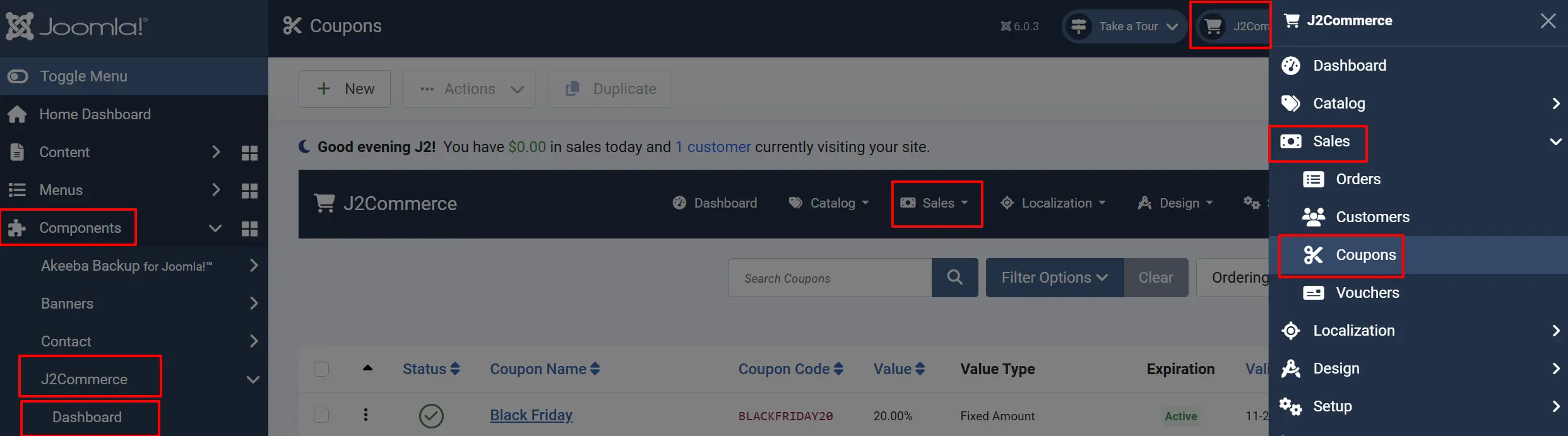
Coupons are managed from the J2Commerce Dashboard.
There are two ways you can access the coupons.
Option A: Go to the J2Commerce icon at the top right corner -> Sales -> Coupons
Option B: Go to Components on the left sidebar -> J2Commerce -> Dashboard -> Sales -> Coupons
Coupons List View
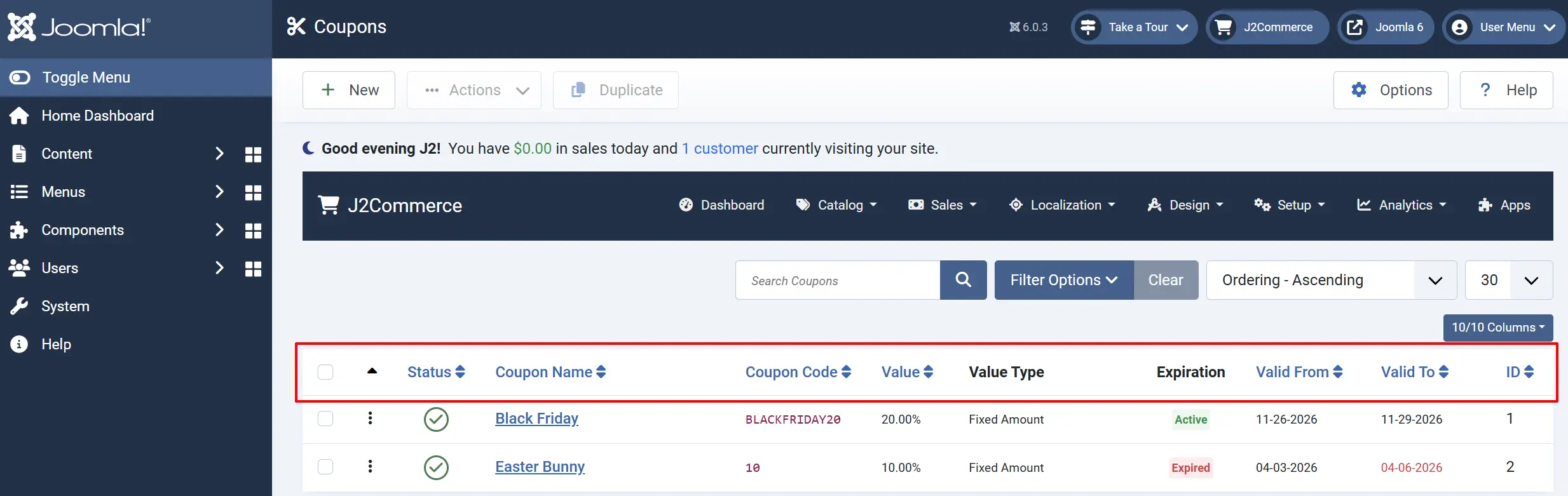
The coupons list displays all configured discount codes:
Status: Published (green) or Unpublished (grey)
Coupon Name: Internal name for the coupon
Coupon Code: Coupon code customers enter at checkout
Value: Discount amount or percentage
Value Type: Discount type (Fixed Cart, Percentage, etc.)
Expiration: Displays if the coupon is active or expired.
Valid From: Start date of validity period
Valid To: End date of validity period
ID: Internal coupon ID
Filter Options
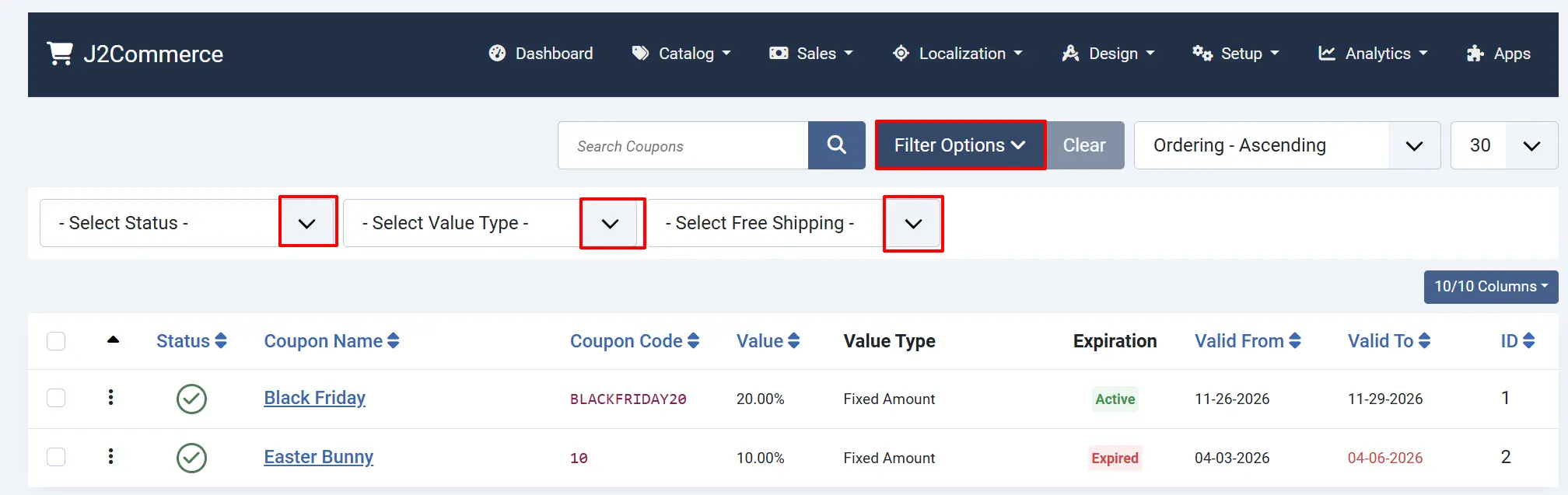
Search: Search by coupon name or code
Status: Filter by published/unpublished
Type: Filter by discount type (percentage/fixed)
Free Shipping: Filter by free shipping status
Creating a Coupon
- Click New in the toolbar.
- Configure the coupon settings (see fields below).
Coupon Fields
Basic Settings Tab
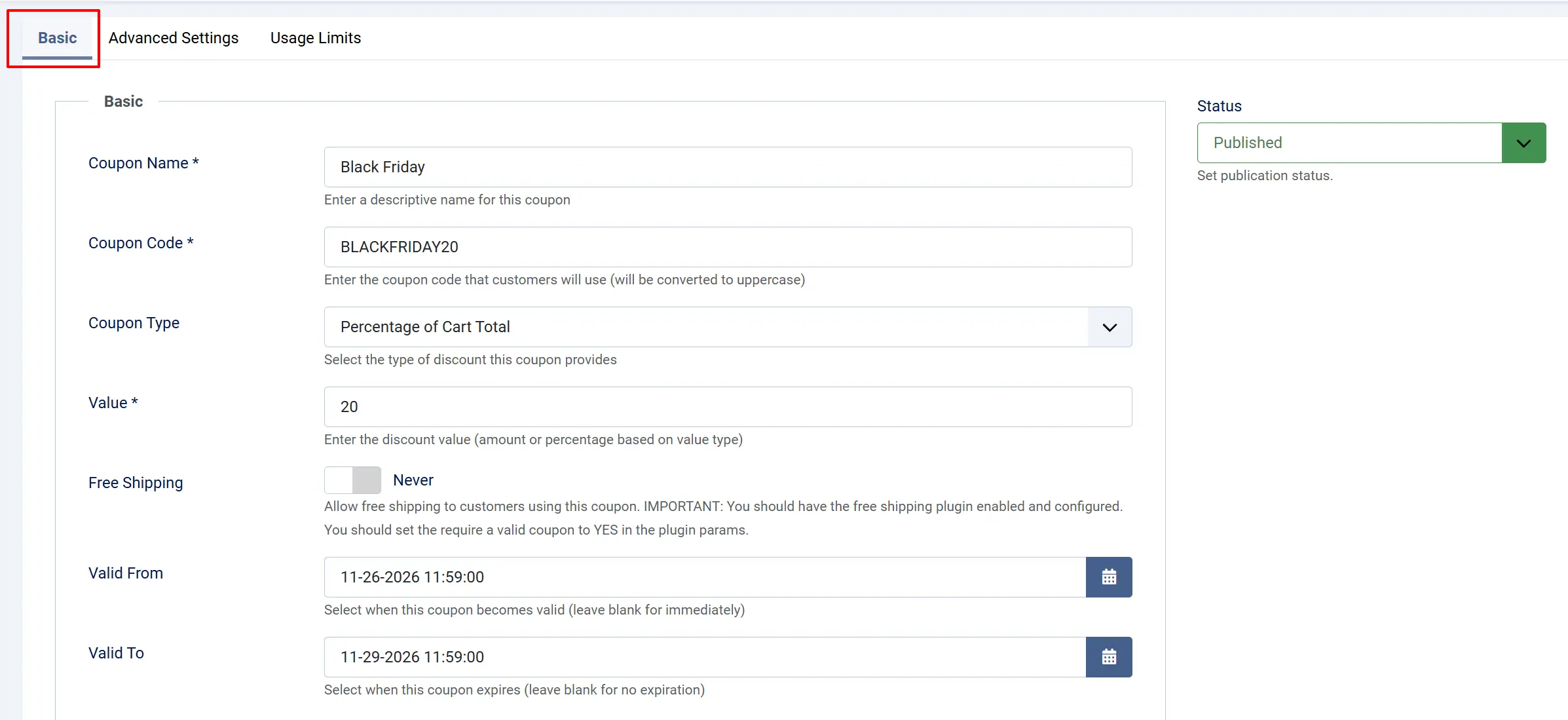
| Field | Description | Example |
|---|---|---|
| Coupon Name | Internal name for identification | Summer Sale 20% |
| Coupon Code | Code customers enter at checkout | SUMMER20 |
| Coupon Type | Type of discount | Fixed Cart, Percentage, etc. |
| Value | Discount amount or percentage | 20 (for 20% or [dollar]20) |
| Free Shipping | Enable free shipping with coupon | Yes/No |
| Valid From | Start date for coupon validity | 2026-06-01 |
| Valid To | End date for coupon validity | 2026-06-30 |
Coupon Types
| Type | Description | Value Meaning |
|---|---|---|
| Fixed Cart | Fixed amount off entire cart | [dollar]20 off total |
| Fixed Product | Fixed amount off each product | [dollar]5 per item |
| Percentage Cart | Percentage off entire cart | 20% off total |
| Percentage Product | Percentage off each product | 10% per item |
Advanced Settings tab
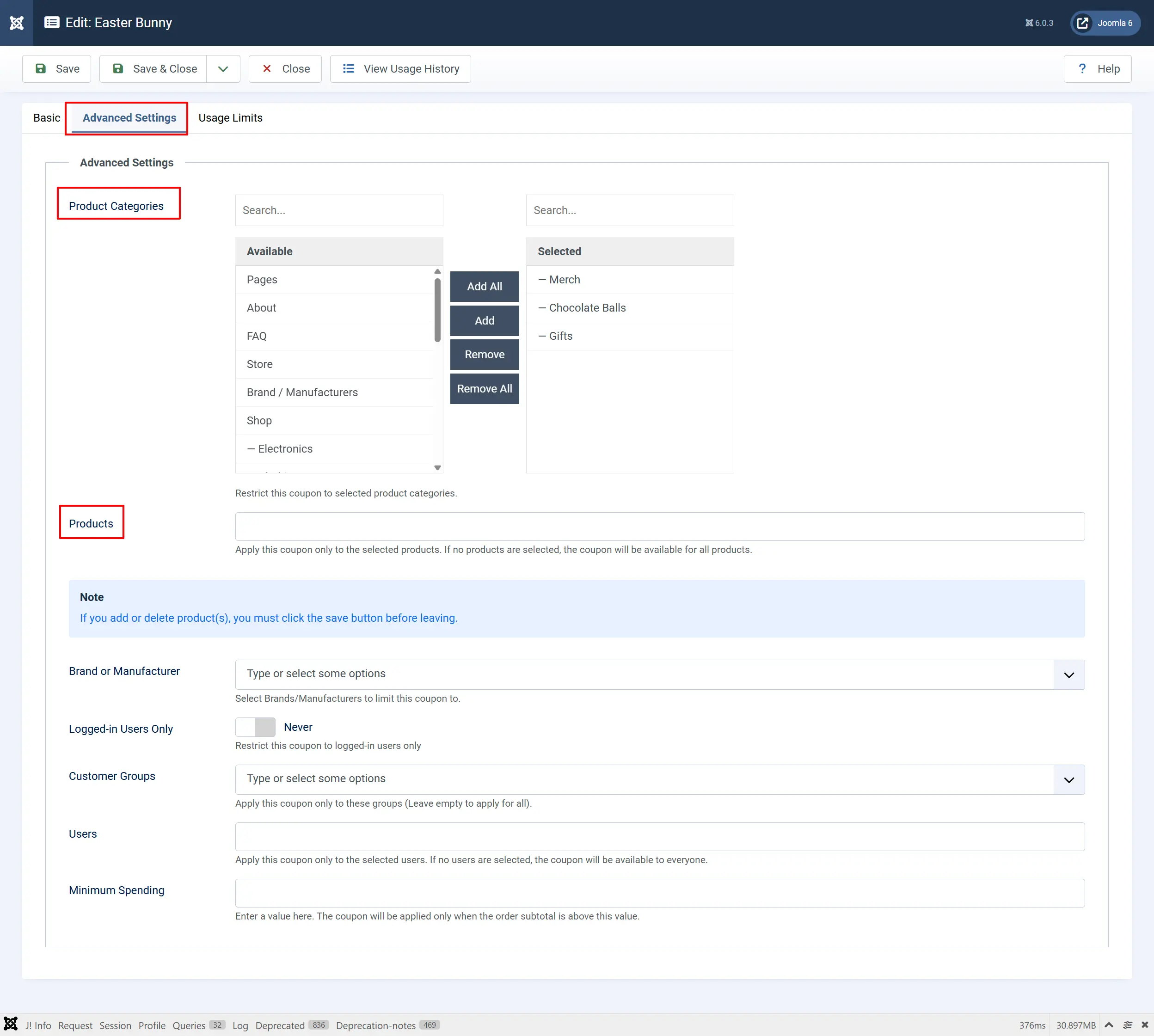
Product Categories: Restrict to selected categories
Products: Restrict to selected products
Brand/Manufacturer: Restrict to selected brands
Logged-in Users Only: Restrict to registered customers
Customer Groups: Restrict to user groups
Users: Restrict to specific users
Minimum Spending: Minimum order subtotal required
Usage Limit Tab
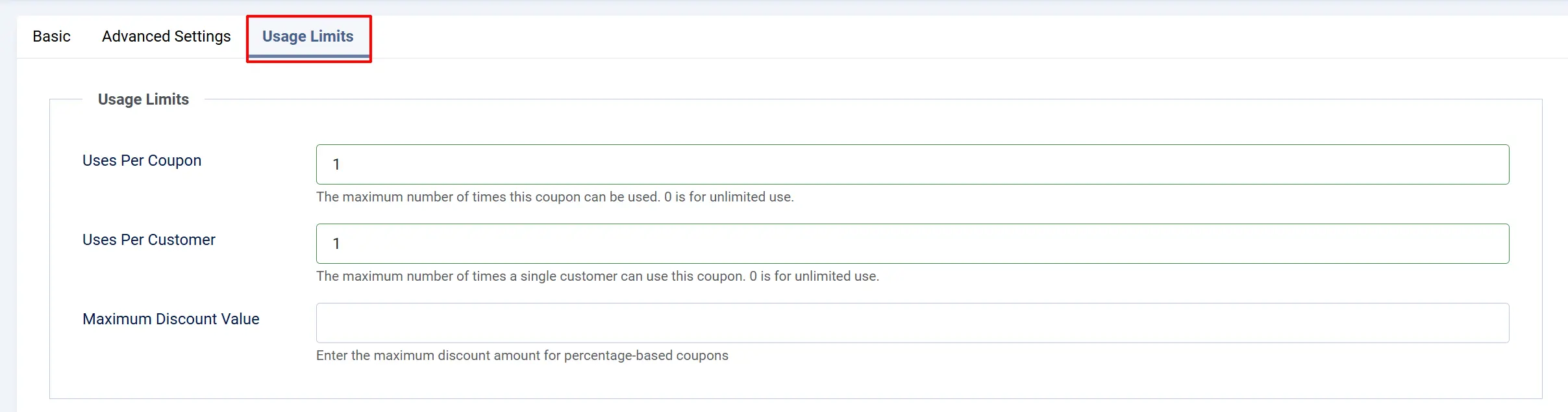
Uses Per Coupon: Maximum total uses (0 = unlimited)
Uses Per Customer: Max uses per customer (0 = unlimited)
Maximum Discount Value: Max discount for percentage coupons
How Coupons Work
Discount Calculation
-
Fixed Cart: Subtract the value from the order subtotal
- Example: [dollar]20 off a [dollar]100 order = [dollar]80 total
-
Percentage Cart: Apply percentage to subtotal
- Example: 20% off [dollar]100 = [dollar]20 discount = [dollar]80 total
-
Fixed Product: Subtract value from each matching product
- Example: [dollar]5 off each item × 3 items = [dollar]15 total discount
-
Percentage Product: Apply percentage to each matching product
- Example: 10% off [dollar]50 item × 2 items = [dollar]10 total discount
Validation Process
When a customer applies a coupon, J2Commerce validates:
- A coupon exists and is published
- Date validity — Current date is within the Valid From/To range
- Usage limits — Total uses haven't exceeded the limit
- Customer usage — Customer hasn't exceeded their personal limit
- Login requirement — Customer is logged in (if required)
- Minimum spending — Order subtotal meets minimum
- Product/category restrictions — Order contains qualifying items
- User/group restrictions — Customer is in the allowed group
Free Shipping Coupons
When Free Shipping is enabled:
- The shipping cost is set to zero
- Requires the Free Shipping plugin to be enabled
- Configure the Free Shipping plugin to require a valid coupon
Tips
- Use descriptive names — "Summer Sale 20%" is easier to identify than "Coupon 1"
- Set expiration dates — Prevent old coupons from being used unexpectedly
- Test your coupons — Create a test order to verify discount calculations
- Use usage limits — Prevent unlimited use of high-value discounts
- Restrict by category — Target promotions to specific product lines
- Monitor coupon usage — Check order history for coupon usage patterns
Troubleshooting
Coupon Not Working at Checkout
Cause: One or more validation rules are failing.
Solution:
- Check if the coupon is Published.
- Verify the current date is within Valid From and Valid To.
- Ensure Uses Per Coupon hasn't been reached.
- Check if Logged-in Users Only is enabled — the customer must be logged in.
- Verify the order subtotal meets the minimum spending.
- Check product restrictions — order must contain qualifying products.
Percentage Discount Exceeds Expected Amount
Cause: Maximum discount value not set.
Solution:
- Edit the coupon.
- Set the Maximum Discount Value to cap the discount.
- Example: 20% off with max [dollar]50 means even a [dollar]500 order only gets [dollar]50 off.
Free Shipping Not Applying
Cause: Free Shipping plugin not configured correctly.
Solution:
- Go to J2Commerce → Setup→ Shipping Methods.
- Ensure the Free Shipping plugin is published.
- Edit the Free Shipping plugin and check Require Valid Coupon.
- Set Minimum Order Amount if needed.
- Save the plugin settings.
Coupon Code Input Shows Error
Cause: Invalid coupon format or already applied.
Solution:
- Coupon codes are case-insensitive.
- Check if the coupon is already applied to the cart.
- Verify the code matches exactly — no extra spaces.
- Clear the cart and try again.
Coupon Restricted to Products Not Working
Cause: Products not properly associated or save required.
Solution:
- Edit the coupon.
- In the Products field, select the products.
- Important: Click Save after selecting products before leaving the page.
- The note in the interface reminds you: "If you add or delete product(s), you must click the save button before leaving."