Web Services - J2Commerce
The Web Services - J2Commerce plugin exposes your store data through a REST API. Once enabled, external applications can read and manage your products, orders, customers, inventory, coupons, reports, and more using standard HTTP requests.
This plugin is the gateway for all J2Commerce API access. Without it enabled, no API endpoints are available.
Requirements
- PHP 8.3.0+
- Joomla! 6.x
- J2Commerce 6.x
- HTTPS enabled on your site (strongly recommended)
Enable the Plugin
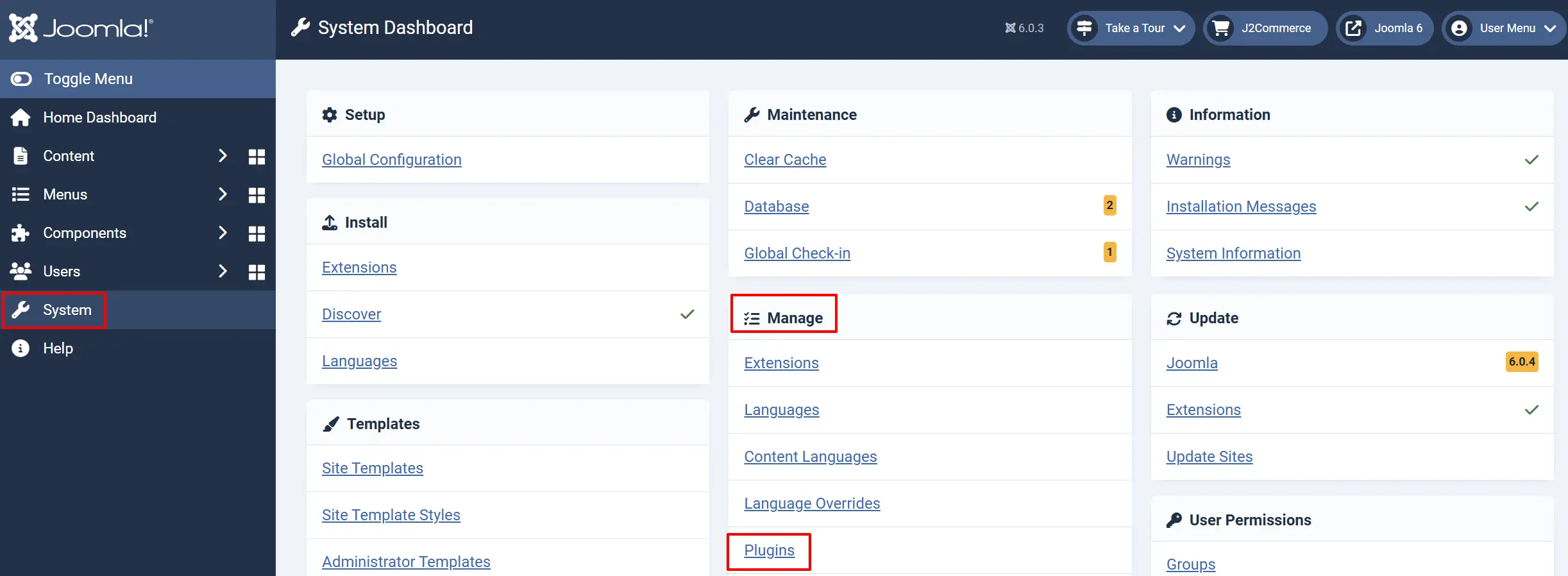
-
Go to System -> Manage -> Extensions.
-
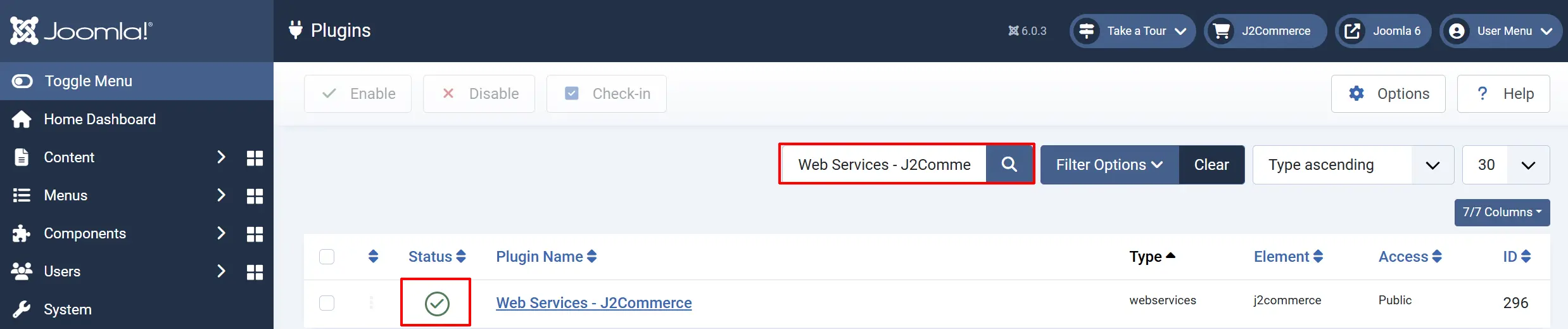
Search for Web Services - J2Commerce.
-
Verify it shows a green checkmark (enabled). If not, click the status icon to enable it.
What the Plugin Provides
The plugin registers over 40 REST API endpoints organized into these groups:
Catalog Data
Endpoint and Descriptions are listed below.
/v1/j2commerce/products: List, view, create, update, and delete products
/v1/j2commerce/products/[id]/variants : List product variants for a specific product
/v1/j2commerce/manufacturers: Manage product manufacturers/brands
/v1/j2commerce/currencies: View and manage store currencies
/v1/j2commerce/countries: List countries
/v1/j2commerce/zones: List zones (states/provinces)
/v1/j2commerce/countries/[id]/zones: List zones for a specific country
Orders and Customers
Endpoint and Descriptions are listed below.
/v1/j2commerce/orders: List, view, create, and update orders
/v1/j2commerce/orders/[id]/items: View line items for an order
/v1/j2commerce/orders/[id]/history: View or add order history entries
/v1/j2commerce/customers: List, view, and manage customer records
/v1/j2commerce/customers/[id]/addresses: List addresses for a customer
/v1/j2commerce/customers/[id]/orders: List orders for a customer
Promotions
Endpoint and Descriptions are listed below.
/v1/j2commerce/coupons: Create, view, update, and delete coupons
/v1/j2commerce/vouchers: Create, view, update, and delete vouchers
Inventory
Endpoint and Descriptions are listed below.
/v1/j2commerce/inventory: View and update product stock levels
Shipping and Payment
Endpoint and Descriptions are listed below.
/v1/j2commerce/shippingmethods: Manage shipping methods
/v1/j2commerce/paymentmethods: Manage payment methods
Tax Configuration
Endpoint and Descriptions are listed below.
/v1/j2commerce/taxprofiles: Manage tax profiles
/v1/j2commerce/taxrates: Manage tax rates
/v1/j2commerce/orderstatuses: Manage order statuses
Reports
Endpoint and Descriptions are listed below.
/v1/j2commerce/reports/sales: Sales report data
/v1/j2commerce/reports/products: Product performance report
/v1/j2commerce/reports/customers: Customer report data
/v1/j2commerce/reports/inventory: Inventory report data
Configuration
Endpoint and Descriptions are listed below.
/v1/j2commerce/config: View store configuration
Authentication
All write operations and most read operations, require authentication using a Joomla API token (Bearer Token).
Your API token can be used with External MCP Servers or Third-Party Apps as an example.
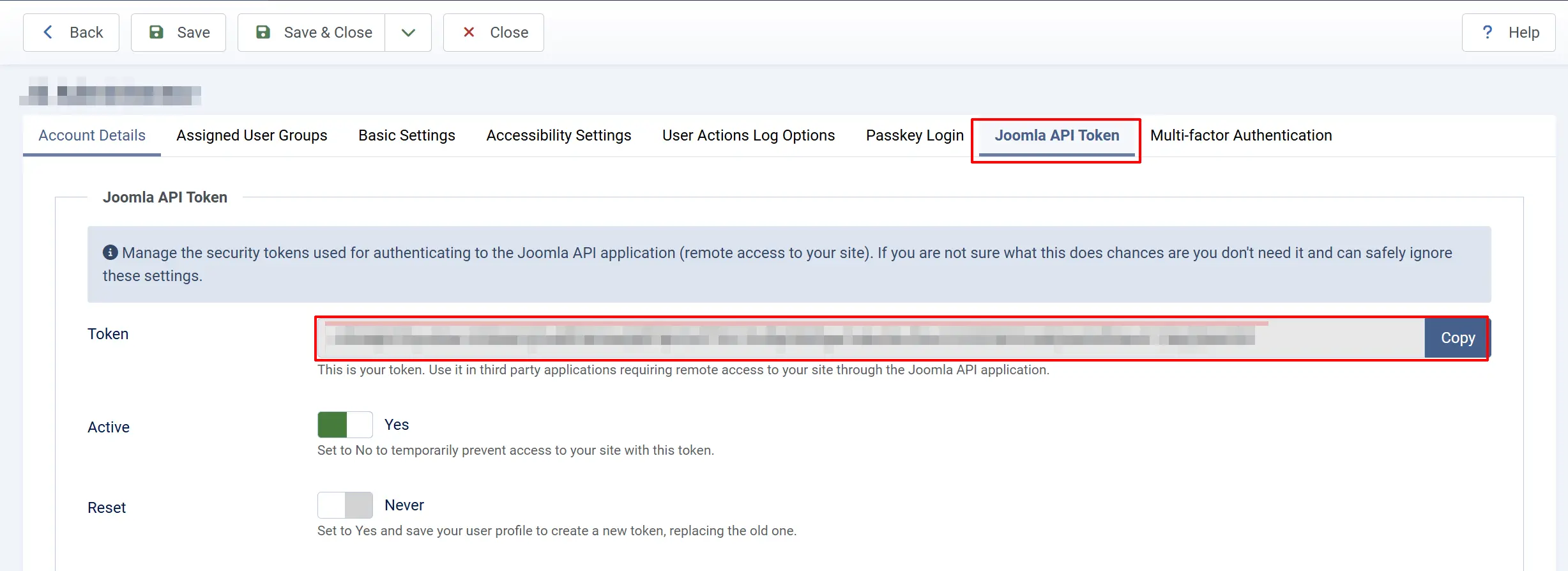
Step 1: Create an API token for your user account:
- Go to Users -> Manage.
- Click your user account.
- Switch to the Joomla API Token tab.
- Click Generate to create a new token.
- Copy and save the token securely — it will not be shown again.
Step 2: Include the token in your API requests using the Authorization header:
Authorization: Bearer YOUR_API_TOKEN_HERE
Quick Test
After enabling the plugin and generating a token, test the API with a simple request to list your products.
Using curl:
curl -X GET "https://yoursite.com/api/v1/j2commerce/products" \
  -H "Authorization: Bearer YOUR_API_TOKEN_HERE" \
  -H "Accept: application/vnd.api+json"
Using a browser-based tool: Open a tool like Postman, set the request method to GET, enter the URL https://yoursite.com/api/v1/j2commerce/products, add the Authorization header, and send.
If the request returns a JSON response with your product data, the API is working correctly.
When Do You Need This Plugin?
Enable this plugin if you need to:
- Connect to third-party services like ShipStation, QuickBooks, Zapier, or warehouse management systems.
- Build a mobile app that reads product catalogs and places orders.
- Create custom dashboards that pull real-time sales and inventory data.
- Automate store management using scripts that update inventory, apply coupons, or process orders.
- Power a headless storefront where the frontend is built with React, Vue, or another framework.
- Use the J2Commerce MCP server (AI assistant integration) — the MCP server communicates through this API.
If you do not need any of these capabilities, you can leave the plugin disabled.
Tips
- Always use HTTPS. API tokens are sent with every request. Without HTTPS, tokens are transmitted in plain text and can be intercepted.
- Create dedicated API users. Instead of using your Super Admin account, create a dedicated user with only the permissions the integration needs.
- Keep tokens secret. Treat API tokens like passwords. Never share them in emails, commit them to code repositories, or expose them in client-side JavaScript.
- Disable when not in use. If you are not actively using the API, disable the plugin to reduce the attack surface of your site.
Troubleshooting
API returns 404 Not Found
Cause: The Web Services plugin is not enabled, or the URL path is incorrect.
Solution:
- Go to System -> Manage -> Plugins and confirm Web Services - J2Commerce is enabled.
- Verify the URL includes
/api/before the version path (e.g.,https://yoursite.com/api/v1/j2commerce/products). - Check that Joomla's URL rewriting is configured. The
.htaccessfile (Apache) or equivalent must be in place.
API returns 401 Unauthorized
Cause: The API token is missing, invalid, or expired.
Solution:
- Verify the
Authorizationheader is set toBearer YOUR_TOKEN(with a space between "Bearer" and the token). - Generate a new token if the current one does not work (Users -> Manage -> your account -> Joomla API Token tab).
- Ensure the user account associated with the token has the necessary J2Commerce permissions.
API returns 403 Forbidden
Cause: The authenticated user does not have permission for the requested operation.
Solution:
- Check the user's group permissions under Users -> Manage -> the user account -> Assigned User Groups.
- Ensure the user belongs to a group with J2Commerce admin access.
- For write operations (POST, PATCH, DELETE), the user needs edit/create/delete permissions on the relevant resource.
API returns empty results
Cause: No data exists for the requested resource, or filters are too restrictive.
Solution:
- Verify that products, orders, or other data exists in your J2Commerce admin.
- Remove any query parameters that might be filtering results.
- Try the request without filters first to confirm the endpoint works, then add filters back one at a time.