Sales Management
Sales management in J2Commerce provides comprehensive tools for managing your store's commercial operations. Track orders from placement to delivery, manage customer relationships, and create promotional campaigns with discount coupons.
Overview
The Sales section contains three key areas:
Orders: The purpose is to view and manage customer orders, update statuses, and process refunds
Customers: The purpose is to view registered customers and their order history
Coupons: The purpose is to create and manage discount codes for promotions
Key Features
Orders
- View all orders with filtering by status, date, customer, and payment method
- Order details include billing/shipping addresses, items, totals, and payment information
- Update order statuses with customer notifications
- Print invoices and packing slips
- Resend confirmation emails
- View order history timeline
Customers
- Customer list with email, name, and contact information
- View total orders and total spent per customer
- Filter customers by country
- View the customer's order history
Coupons
- Percentage discounts (cart-wide or per-product)
- Fixed amount discounts
- Free shipping coupons
- Time-limited promotions with start and end dates
- Usage limits per coupon and per customer
- Restrict by product, category, brand, or customer group
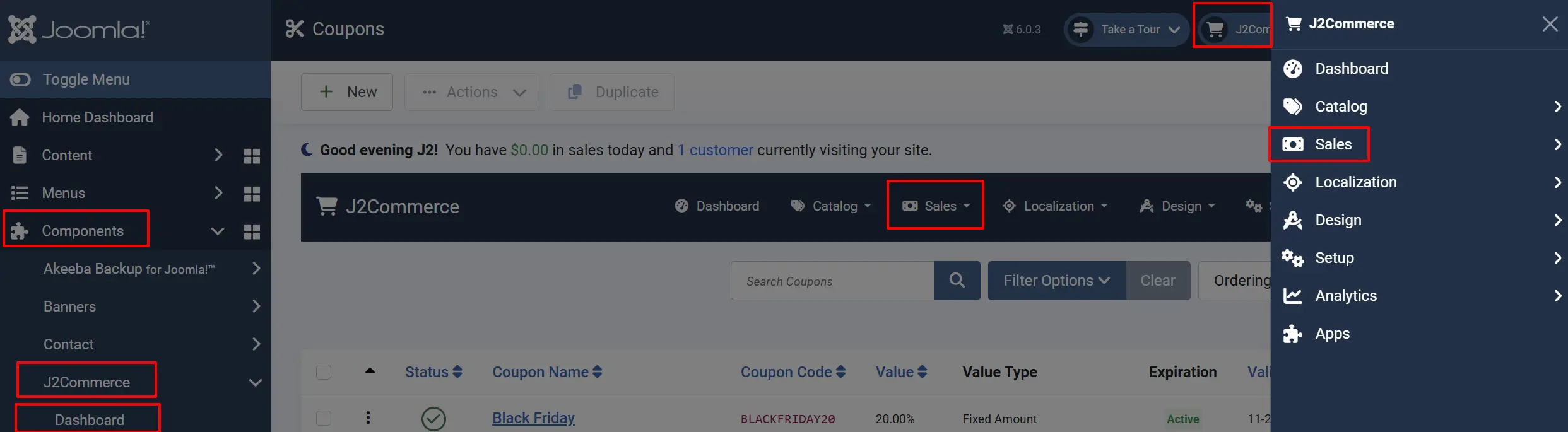
Locating the Sales Features
There are two ways you can access the sales features.
Option A: Go to the J2Commerce icon at the top right corner -> Sales
Option B: Go to Components on the left sidebar -> J2Commerce -> Dashboard -> Sales