Localisation
J2Commerce provides comprehensive localisation features to help you configure your store for different regions and markets. From managing countries and currencies to setting up complex tax rules and order statuses, the localisation system ensures your store operates correctly for customers worldwide.
Requirements
- PHP 8.3.0 or higher
- Joomla 6.x
- J2Commerce 6.x
All localisation features are included with J2Commerce core and require no additional installation.
Overview
Localisation in J2Commerce covers several key areas:
- Countries and Zones — Define the countries and regions (states, provinces, territories) for shipping and billing addresses.
- Currencies — Set up multiple currencies for international sales with automatic exchange rate support.
- Geozones — Create geographic zones that group countries and zones together for shipping rates and tax calculations.
- Tax Profiles and Tax Rates — Configure tax rules based on customer location and product types.
- Order Statuses — Manage the workflow states for customer orders.
- Measurement Units — Define weight and length units for products and shipping calculations.
Accessing Localization
All localisation features are accessed from the J2Commerce Dashboard:
There are two ways you can access the Localisation section.
Option A: Go to the J2Commerce icon at the top right corner -> Localisation
Option B: Go to Components on the left sidebar -> J2Commerce -> Dashboard -> Localisation
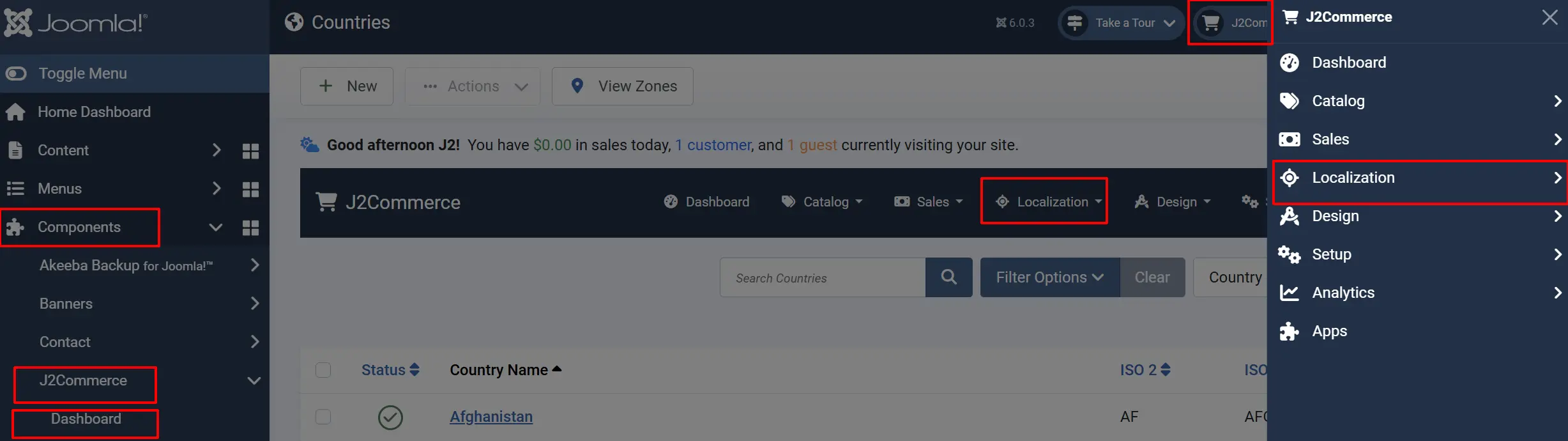
Localisation Features
Countries
Manage the list of countries available for shipping addresses, billing addresses, and tax calculations. Each country includes ISO standard codes for international compatibility.
Zones
Define states, provinces, or regions within each country. Zones are essential for accurate shipping rate calculations and tax rules based on customer location.
Currencies
Configure multiple currencies for international stores. Set exchange rates, currency symbols, and formatting options for each currency.
Geozones
Create geographic zones by grouping countries and zones together. Geozones are used to apply shipping rates, tax rates, and payment method restrictions to specific regions.
Tax Profiles
Create tax profiles (tax classes) that group tax rules together. Assign tax profiles to products to control which tax rates apply.
Tax Rates
Define specific tax percentage rates that apply to geozones. Tax rates are linked to tax profiles and calculated based on customer location.
Lengths
Configure measurement units for product dimensions (centimetres, inches, metres, etc.) used in shipping calculations and product specifications.
Weights
Set up weight units (kilograms, pounds, ounces, etc.) for product weights and shipping rate calculations.
Typical Configuration Order
For a new store, configure localisation features in this order:
- Countries — Add or enable the countries you will ship to.
- Zones — Add states, provinces, or regions for each country.
- Geozones — Create zones that group countries for shipping and tax rules.
- Lengths — Set up your default length unit and any additional units needed.
- Weights — Set up your default weight unit and any additional units needed.
- Currencies — Configure your base currency and any additional currencies.
- Tax Profiles — Create tax profiles for different product types.
- Tax Rates — Add tax rates linked to geozones and tax profiles.