UIKit Layouts
UIKit 3 is a lightweight CSS and JavaScript framework developed by YOOtheme. It is the foundation of YOOtheme Pro — one of the most popular Joomla template builders — and is also used by a handful of other Joomla template providers. When your Joomla template is built on UIKit 3, selecting the UIKit layout in J2Commerce makes your product pages use UIKit's grid, card, and button classes so everything looks consistent.
How to tell if your template uses UIKit
The fastest way to check is to open any page on your site, right-click, and choose Inspect (or View Page Source). Look for class names that begin with uk- — for example uk-grid, uk-card, or uk-button. If you see that prefix consistently, your template is UIKit 3.
YOOtheme Pro templates always use UIKit 3. If you purchased your template from yootheme.com, you are using UIKit. You can also check your template provider's documentation — it will state "UIkit 3" if applicable.
Common UIKit 3 classes
When customising your J2Commerce layout overrides for a UIKit template, you will work with these classes:
Grid
| Class | What it does |
|---|---|
uk-grid | Activates the UIKit grid on a container element |
uk-child-width-1-2@m | Makes each child element half-width at medium screens and above |
uk-child-width-1-3@l | Makes each child element one-third width at large screens and above |
uk-child-width-1-4@xl | Makes each child element one-quarter width at extra-large screens |
Spacing
| Class | What it does |
|---|---|
uk-margin | Adds default top margin |
uk-margin-top | Adds top margin only |
uk-padding | Adds default padding on all sides |
uk-margin-remove | Removes all margins |
Buttons
| Class | What it does |
|---|---|
uk-button | Base button style — always required |
uk-button-default | Standard outlined button |
uk-button-primary | Filled button in the primary colour |
uk-button-danger | Filled button indicating a destructive action |
Cards
| Class | What it does |
|---|---|
uk-card | Base card container — always required |
uk-card-default | Card with a subtle border and shadow |
uk-card-body | Inner padding area of a card |
uk-card-title | Heading inside a card |
Alerts
| Class | What it does |
|---|---|
uk-alert | Base alert container — always required |
uk-alert-success | Green success message |
uk-alert-danger | Red error message |
uk-alert-warning | Yellow warning message |
Display utilities
| Class | What it does |
|---|---|
uk-hidden | Hides the element on all screen sizes |
uk-visible@m | Shows the element only at medium screens and above |
uk-flex | Applies flexbox layout |
uk-flex-center | Centres flex children horizontally |
Text utilities
| Class | What it does |
|---|---|
uk-text-center | Centres text |
uk-text-left | Left-aligns text |
uk-text-bold | Makes text bold |
uk-text-muted | Applies a lighter muted colour to text |
Full class reference: getuikit.com/docs/introduction
Selecting the UIKit layout in J2Commerce
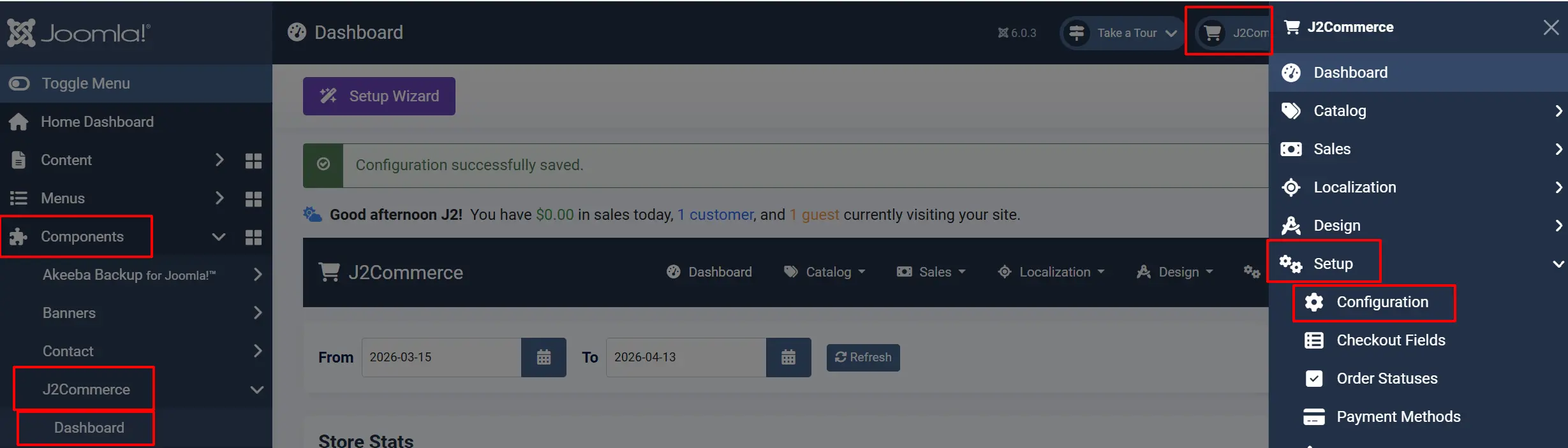
- Go to J2Commerce -> Setup -> Configuration.
-
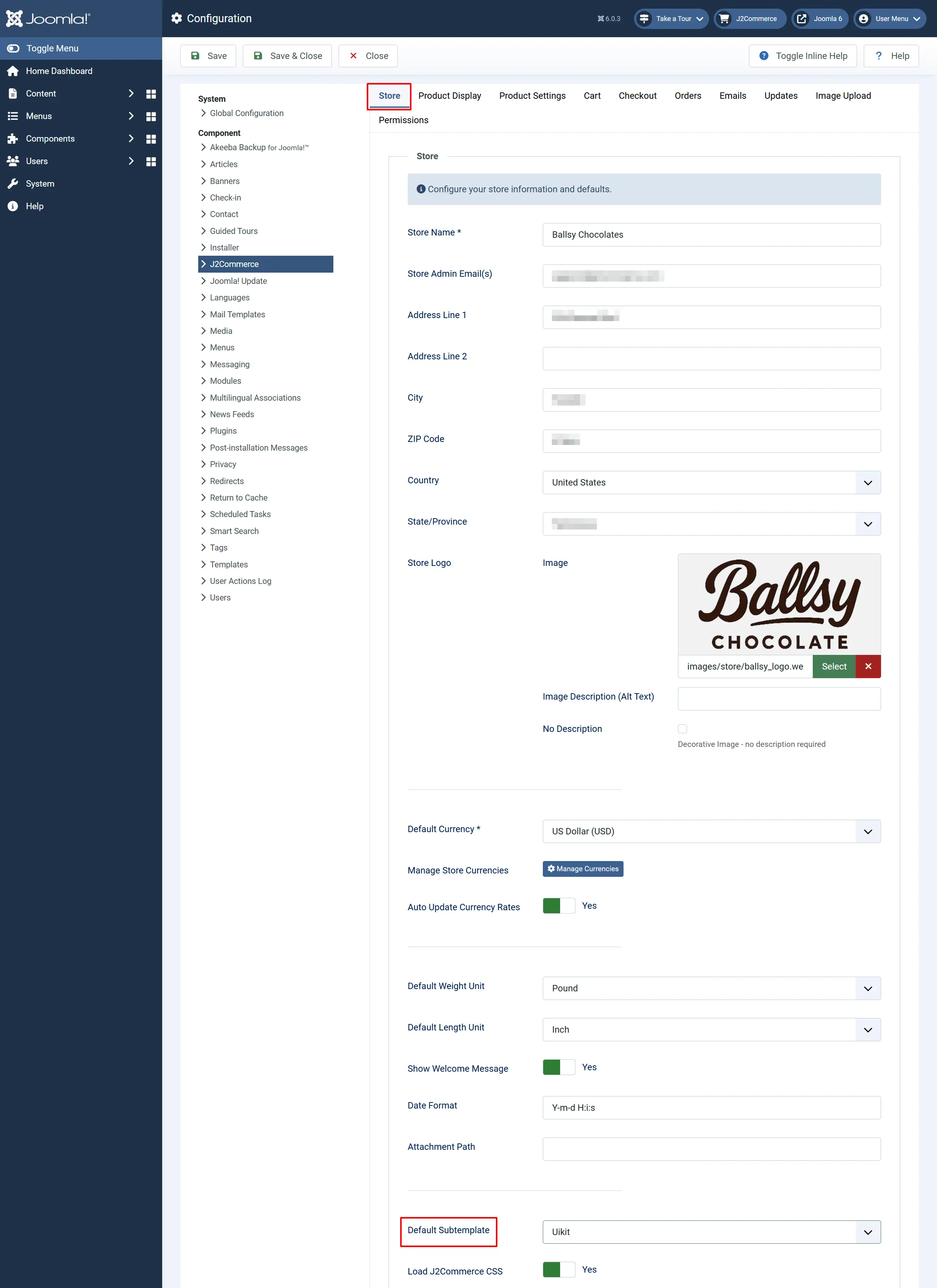
Click the Store tab.
-
Find the Sub-template field and select UIKit.
-
Click Save.
All product listing and detail pages across your site will now use the Bootstrap 5 layout files. You can override this per menu item — open any J2Commerce menu item that connects to your products (ie; Store) in Menus -> Main Menu. Open the appropriate menu item and click on the Categories AND Category tabs, and set the Sub-template field on both tabs.
Joomla templates that use UIKit
YOOtheme Pro
YOOtheme Pro is by far the most widely used UIKit-based Joomla template system, with over 150,000 customers. Every YOOtheme Pro template is built on UIKit 3. YOOtheme Pro includes a powerful drag-and-drop page builder and over 100 pre-built Joomla template designs, all sharing the same UIKit foundation.
If your site was built with YOOtheme Pro, select the UIKit layout in J2Commerce.
Warp 7 (legacy YOOtheme)
Warp 7 was YOOtheme's earlier template framework, released in 2013 and built on UIKit 2. YOOtheme officially sunset Warp 7 themes in 2021 and migrated customers to YOOtheme Pro. If your site is still running a Warp 7 template, the UIKit layout in J2Commerce may work, but upgrading to a YOOtheme Pro template is strongly recommended for Joomla 5 and 6.
Other UIKit-based templates
A smaller number of Joomla template providers use UIKit as their underlying framework. According to the Joomla Extensions Directory, around 46 Joomla 5 templates are built on UIKit. Always check your template's feature list or inspect the HTML source to confirm before selecting the UIKit layout.
Tips
- If you switch your J2Commerce layout from Bootstrap 5 to UIKit (or vice versa), clear your Joomla cache after saving. Go to Home Dashboard -> System -> Cache and clear all caches.
- When creating template overrides for J2Commerce on a UIKit site, copy files from
components/com_j2commerce/layouts/app_uikit/as your starting point. - UIKit uses
@m,@l, and@xlbreakpoint suffixes (e.g.,uk-child-width-1-3@l). This is different from Bootstrap 5's hyphenated breakpoints (col-lg-4). Keep this in mind when writing custom CSS. - The UIKit layout and the Bootstrap 5 layout cover the same product types and views, so switching between them is safe — no functionality is lost.
Troubleshooting
Products look unstyled or the layout is broken
Cause: A layout mismatch — your template uses Bootstrap 5 but J2Commerce is set to UIKit (or vice versa).
Solution:
- Open any page on your site, right-click, and choose Inspect.
- Look for class names starting with
uk-(UIKit) orcol-md-*(Bootstrap 5). - Go to J2Commerce -> Setup -> Configuration -> Store tab.
- Set Sub-template to match what you found — UIKit or Bootstrap 5.
- Click Save, then go to Home Dashboard -> System -> Cache and clear all caches.
The Layout dropdown is empty or shows a warning
Cause: No layout app plugin is enabled in J2Commerce.
Solution:
- Go to J2Commerce -> Apps.
- Search for UIKit or Bootstrap.
- Enable the appropriate layout app by clicking the status toggle.
- Return to J2Commerce -> Setup -> Configuration and the Sub-template field will now show options.
UIKit grid is not creating columns — products stack vertically
Cause: The uk-grid attribute must be on the parent element and each child needs a width class. If you are using a layout override, check that both are present.
Solution:
- Open your layout override file.
- Confirm the product list wrapper has the
uk-gridattribute — for example<ul class="uk-grid-small uk-child-width-1-2@s uk-child-width-1-3@m" uk-grid>. - Save the file and reload the page.
YOOtheme Pro custom fields are not rendering inside J2Commerce layouts
Cause: YOOtheme Pro custom fields are rendered by YOOtheme's own field system, which operates separately from J2Commerce's layout rendering.
Solution: Use standard Joomla custom fields or J2Commerce custom fields for checkout and product data. Contact YOOtheme support for advice on integrating YOOtheme-specific fields with third-party components.