Bootstrap 5 Layouts
Bootstrap 5 is the default CSS framework built into Joomla 5 and Joomla 6. Most Joomla templates — including Joomla's own default template Cassiopeia — are built on Bootstrap 5. When you select the Bootstrap 5 layout in J2Commerce, your product listings and detail pages use Bootstrap 5 grid, card, and button classes that match the rest of your site.
How to tell if your template uses Bootstrap 5
Most templates built for Joomla 5 or Joomla 6 use Bootstrap 5. The clearest way to confirm is to open any page on your site, right-click, and choose Inspect (or View Page Source). Look at the HTML for class names like container, row, col-md-6, btn btn-primary, or card. If you see those patterns, your template is Bootstrap 5.
You can also check your template's documentation or product page. Template providers typically list "Bootstrap 5" as a feature for modern templates.
Common Bootstrap 5 classes
When customising your J2Commerce layout overrides, you will work with these Bootstrap 5 classes:
Grid
| Class | What it does |
|---|---|
container | Centres content and adds horizontal padding |
row | Creates a horizontal row of columns |
col-[number] | A column spanning [number] of 12 grid units |
col-md-[number] | Column width applied at medium screens (768 px) and above |
col-lg-[number] | Column width applied at large screens (992 px) and above |
Spacing
| Class | What it does |
|---|---|
mt-3 | Adds top margin (level 3 of 5) |
mb-4 | Adds bottom margin (level 4 of 5) |
p-3 | Adds padding on all sides (level 3) |
mx-auto | Centres a block element horizontally |
Buttons
| Class | What it does |
|---|---|
btn | Base button style — always required |
btn-primary | Filled button in the primary colour |
btn-secondary | Filled button in the secondary colour |
btn-outline-primary | Outlined button in the primary colour |
Cards
| Class | What it does |
|---|---|
card | Container with border and rounded corners |
card-body | Inner padding area of a card |
card-title | Heading inside a card |
card-img-top | Image at the top of a card |
Alerts
| Class | What it does |
|---|---|
alert | Base alert container — always required |
alert-success | Green success message |
alert-danger | Red error message |
alert-warning | Yellow warning message |
Display utilities
| Class | What it does |
|---|---|
d-none | Hides the element on all screen sizes |
d-flex | Applies flexbox layout |
d-block | Forces block display |
d-md-none | Hides the element on medium screens and above |
Text utilities
| Class | What it does |
|---|---|
text-center | Centres text |
text-start | Left-aligns text |
text-end | Right-aligns text |
fw-bold | Makes text bold |
Full class reference: getbootstrap.com/docs/5.3
Selecting the Bootstrap 5 layout in J2Commerce
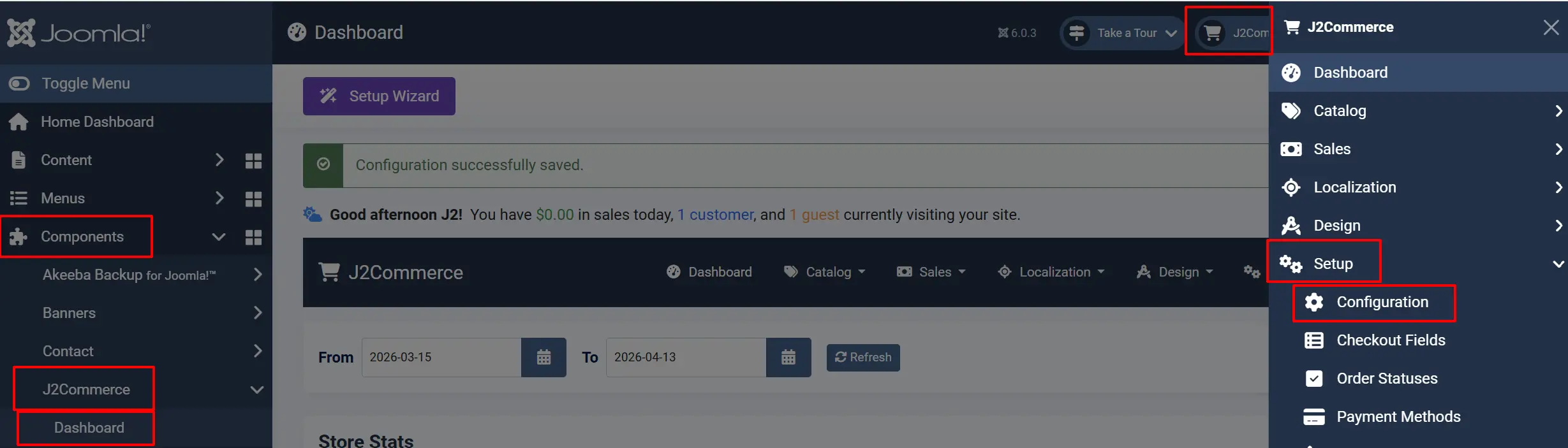
- Go to J2Commerce -> Setup -> Configuration.
-
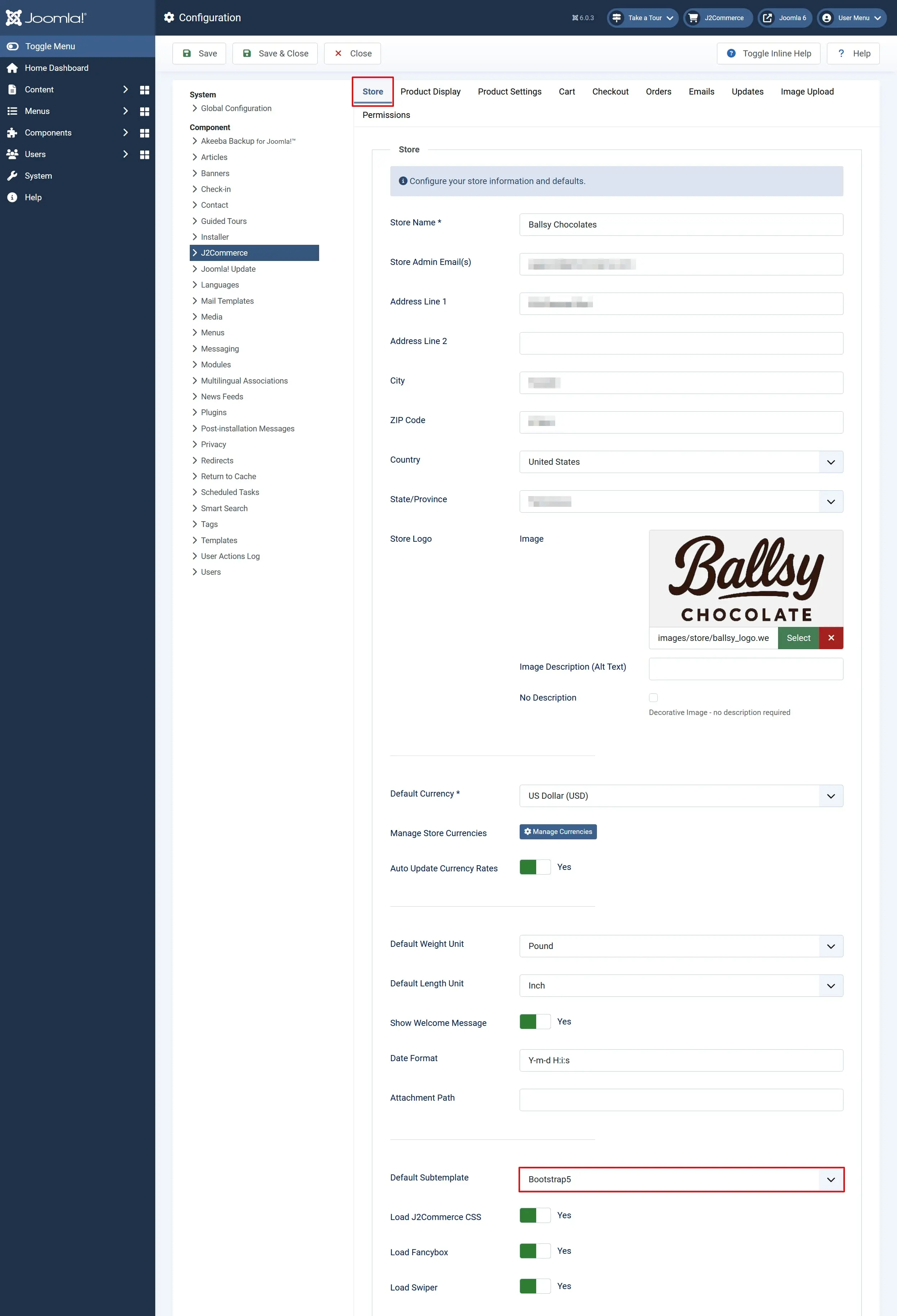
Click the Store tab.
-
Find the Default Subtemplate and select Bootstrap 5.
-
Click Save.
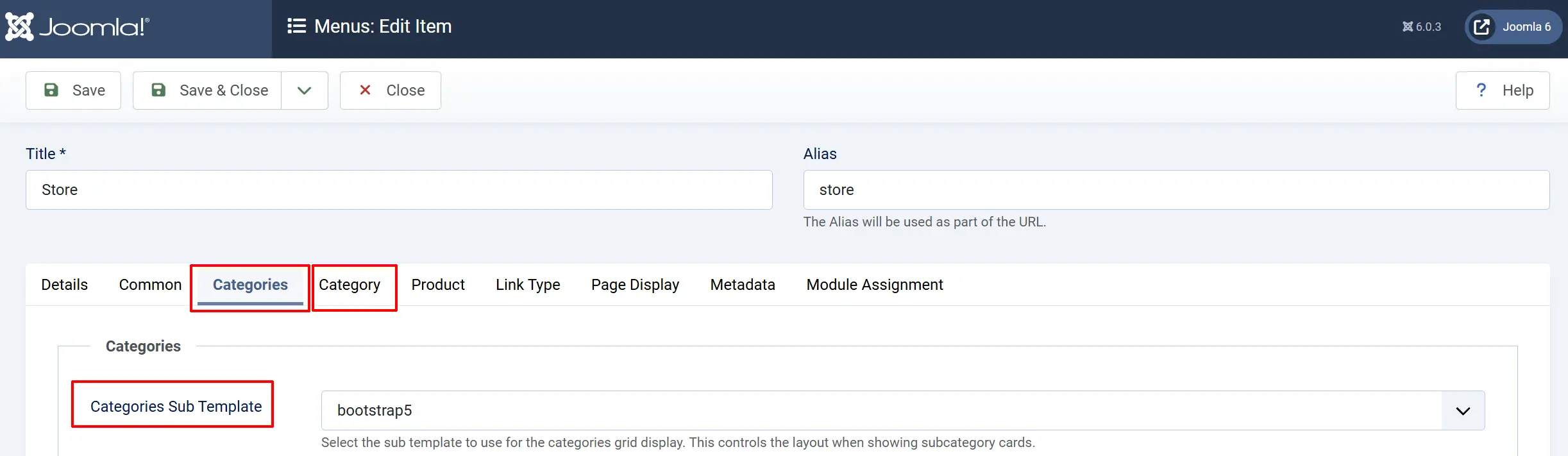
All product listing and detail pages across your site will now use the Bootstrap 5 layout files. You can override this per menu item — open any J2Commerce menu item that connects to your products (ie; Store) in Menus -> Main Menu. Open the appropriate menu item and click on the Categories AND Category tabs, and set the Sub-template field on both tabs.
Joomla templates that use Bootstrap 5
The following popular Joomla template frameworks and providers use Bootstrap 5. If your template comes from one of these providers, select the Bootstrap 5 layout in J2Commerce.
Joomla default template
Cassiopeia — The template that ships with every Joomla 5 and Joomla 6 installation. It is fully built on Bootstrap 5 and is a safe starting point for testing your J2Commerce store.
Template frameworks and page builders
Helix Ultimate / SP Page Builder (JoomShaper) — Helix Ultimate is one of the most widely used Joomla template frameworks. It is built on Bootstrap 5 and integrates with SP Page Builder 5 for drag-and-drop layout editing.
Astroid Framework (TemPlaza) — Astroid is an open-source Bootstrap 5 template framework originally created by JoomDev and now maintained by TemPlaza. A large number of commercial templates from both providers are built on Astroid.
T4 Framework (JoomlArt) — The T4 Framework powers JoomlArt templates. JoomlArt has also acquired the Gavick Pro catalogue, so modern Gavick Pro templates built with T4 are Bootstrap 5 based.
Joomla51 templates — Templates from Joomla51 are built on Bootstrap 5 and designed specifically for Joomla 5 and Joomla 6.
Nicepage — Nicepage is a drag-and-drop Joomla template builder that generates Bootstrap 5 output, allowing you to design visually and still get clean, responsive HTML.
Balbooa Gridbox — The Gridbox page builder for Joomla uses Bootstrap 5 classes in its output.
Quix Page Builder — Quix generates Bootstrap 5 layouts and is compatible with most Joomla 5 templates.
TemplateMonster and marketplaces
Many templates sold on TemplateMonster, ThemeForest, and similar marketplaces for Joomla 5 are built on Bootstrap 5. Check the template's feature list for "Bootstrap 5" to confirm before purchasing.
Tips
- If you switch from UIKit to Bootstrap 5 (or vice versa), clear your Joomla cache after saving the configuration so the new layout files are loaded immediately.
- Bootstrap 5 is the default layout in J2Commerce, so new installations are ready to use without any changes if your template is Bootstrap 5.
- When creating template overrides for J2Commerce, copy files from the
components/com_j2commerce/layouts/app_bootstrap5/folder as your starting point.
Troubleshooting
Products look unstyled or the layout breaks
Cause: A layout mismatch — your template uses UIKit but J2Commerce is set to Bootstrap 5 (or vice versa).
Solution:
- Inspect your template's HTML source and confirm whether it uses
col-md-*(Bootstrap 5) oruk-grid(UIKit) classes. - Go to J2Commerce -> Setup -> Configuration -> Store tab.
- Set Sub-template to match your template's CSS framework.
- Click Save, then go to Home Dashboard -> System -> Cache -> and clear all caches.
The Layout dropdown is empty or shows a warning
Cause: No layout app plugin is enabled in J2Commerce.
Solution:
- Go to J2Commerce -> Apps.
- Search for Bootstrap or UIKit.
- Enable the appropriate layout app by clicking the status toggle.
- Return to J2Commerce -> Setup -> Configuration and the Sub-template field will now show options.
Column widths look wrong on mobile
Cause: The Bootstrap 5 grid needs breakpoint-specific classes to behave correctly at each screen size.
Solution: When overriding layout files, use responsive column classes such as col-12 col-md-6 col-lg-4 rather than a fixed col-4. This ensures products stack correctly on small screens.