Subscription Multiple Quantity
By default, J2Commerce limits subscription products to a quantity of one per order. The Subscription Multiple Quantity add-on removes that restriction, so customers can purchase more than one unit of a subscription product in a single transaction.
Two optional settings let you control how the extra quantity affects pricing: you can charge the sign-up fee per unit, and you can strip shipping charges from automatic renewal orders so returning subscribers are not billed for delivery.
Prerequisites
- J2Commerce 6 installed and configured
- The Subscription Products (
app_subscriptionproduct) add-on installed and enabled — this add-on depends on it - At least one subscription product created and published
Purchase and Download
This plugin is a separate add-on available from the J2Commerce Extensions Store. It is not included with the core J2Commerce 6 component.
Step 1: Go to our J2Commerce website -> Apps
Step 2: Locate the Subscription Multiple Quantity package -> click View Details -> Add to cart -> Checkout.
Step 3: Go to your My Downloads under your profile button at the top right corner and search for the app. Click Available Versions -> View Files -> Download Now
Install the Plugin
If the Subscription Products plugin is not installed when this add-on is activated, the plugin will refuse to load. Install and enable app_subscriptionproduct first.
Go to System > Install -> Extensions
Upload the app_subscriptionmultiplequantity.zip package file or use the Install from URL option.
-e0515ef561b368cb4d5a053cacb4c525.webp)
Enable the Plugin
Once you have installed the app, you will need to enable it. There are two ways you can access the app.
Option A: Go to the J2Commerce icon at the top right corner -> Apps
Option B: Go to Components on the left sidebar -> J2Commerce -> Apps
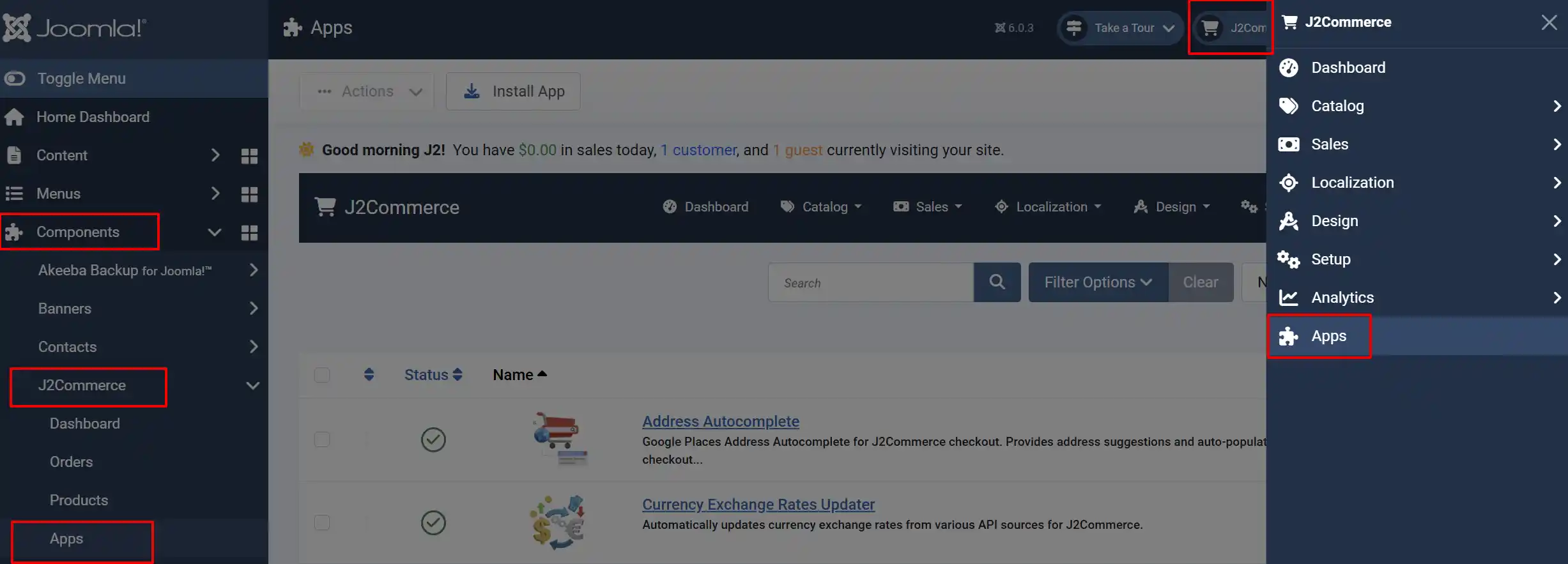
Search for Subscription Multiple Quantity, click the X, and it will turn into a green checkmark. It is now enabled and ready for setup.
Configure the Plugin
Once enabled, click on the title to open it.
Multiply Sign-Up Fee by Quantity: When set to Yes, the one-time sign-up fee is multiplied by the quantity the customer orders. If a customer buys 3 subscriptions and the sign-up fee is $5.00, they are charged $15.00 at checkout. Set to No to charge the sign-up fee only once regardless of quantity.
Remove Shipping for Subscription Renewals: When set to Yes, shipping charges are zeroed out on automatic renewal orders. This prevents customers from being billed for delivery on a digital subscription or when shipping on renewal does not apply to your business model. Set to No to keep the original shipping amount on all renewal orders.
Debug Mode: Enable debug logging for troubleshooting. Disable this in production environments once the add-on is working correctly.
How It Works
Once the plugin is enabled, these changes apply automatically to all subscription products in your store — no per-product configuration is needed.
Multiple Quantity at Checkout
The quantity selector on subscription product pages becomes active. Customers can increase the quantity above 1, and the cart will reflect the correct recurring total for all units.
Sign-Up Fee Calculation
With Multiply Sign-Up Fee by Quantity set to Yes:
- A customer orders 2 units of a subscription with a $10.00 sign-up fee and $19.99/month recurring price.
- Checkout charges $20.00 sign-up fee (2 × $10.00) plus $39.98/month ($19.99 × 2).
With the setting set to No:
- The same order charges $10.00 sign-up fee (once) plus $39.98/month.
Renewal Shipping
With Remove Shipping for Subscription Renewals set to Yes, when the cron job processes a renewal:
- The renewal order is created with shipping set to zero.
- The customer is billed only for the subscription amount, not delivery.
This setting has no effect on the initial checkout order — it only applies to orders created automatically by the renewal cron.
Tips
- If you sell physical subscription boxes, leave Remove Shipping for Subscription Renewals set to No so customers are charged for delivery on each shipment.
- For digital subscriptions, memberships, or access-only products, set Remove Shipping for Subscription Renewals to Yes — there is nothing to ship on renewal.
- The sign-up fee multiplication works together with the Subscription Products plugin settings. If the Subscription Products plugin has Add sign-up fee on each purchase disabled on the product, the sign-up fee is only charged once regardless of this setting.
Troubleshooting
Customers still cannot add more than one subscription to the cart
Cause: The plugin may not be enabled, or the Subscription Products plugin it depends on is missing or disabled.
Solution:
- Go to J2Commerce -> Apps and confirm Subscription Multiple Quantity is enabled (green checkmark).
- Search for Subscription Products and confirm it is also enabled.
- If both are enabled, clear the Joomla cache: System -> Maintenance -> Clear Cache -> Clear All.
- Test the product page again in an incognito browser window.
The sign-up fee is not being multiplied despite the setting being Yes
Cause: The sign-up fee may be set to zero or left empty on the product, or the Subscription Products plugin may have Add sign-up fee on each purchase set to No for repeat customers.
Solution:
- Open the article for the subscription product and go to the J2Commerce tab.
- Confirm the Sign-Up Fee field has a non-zero value.
- If the customer has previously purchased the same product, check whether Add sign-up fee on each purchase is enabled on the product — if it is off, the sign-up fee is skipped for repeat purchases.
Renewal orders are still including shipping even with the removal setting enabled
Cause: The plugin may have been enabled after some subscription renewals were already processed, or the setting was saved as No and not yet changed.
Solution:
- Go to J2Commerce -> Apps and open Subscription Multiple Quantity.
- Confirm Remove Shipping for Subscription Renewals is set to Yes and click Save & Close.
- This change applies to future renewal orders only. Past renewal orders that already included shipping are not retroactively modified.
Debug Mode is enabled but no log file appears
Cause: The Joomla logs directory may not be writable, or no renewal event has been triggered since debug was enabled.
Solution:
- Confirm the
administrator/logs/directory is writable by the web server. - Trigger a cron run by visiting the Subscription Products cron URL in a browser.
- Check
administrator/logs/for a log file from this plugin.
What Changed from J2Store
If you used this add-on with J2Store, here is what is different in J2Commerce 6:
- Plugin Manager configuration — Settings are now managed directly in the standard Joomla Plugin Manager (System -> Manage -> Plugins). There is no longer a separate Apps screen for this plugin.
- Remove Shipping for Subscription Renewals — This option was present in the J2Store version of the plugin but was hidden and undocumented. In J2Commerce 6 it is a clearly labelled toggle in the plugin settings.
- Debug Mode — A dedicated debug toggle is now included for easier troubleshooting.