Subscription - Exclude Renewal Inventory
When a customer renews a subscription, J2Commerce normally reduces your product's stock count — the same way it does for any order. For most subscription stores that is exactly what you want. But for rental and lease businesses, it creates a problem: the item was never returned, so there is nothing new to deduct from stock. Renewing a lease is not the same as selling a new unit.
This add-on solves that problem. Once enabled, it automatically skips stock deduction for any subscription renewal order. Initial subscription purchases still reduce stock as normal — only renewals are excluded.
Prerequisites
- J2Commerce 6 installed and configured
- The Subscription Products add-on installed and enabled (see Subscription Products)
- Inventory tracking enabled on at least one product
Purchase and Download
This plugin is a separate add-on available from the J2Commerce Extensions Store. It is not included with the core J2Commerce 6 component.
Step 1: Go to our J2Commerce website -> Apps
Step 2: Locate the Subscription Exclude Renewal Inventory package -> click View Details -> Add to cart -> Checkout.
Step 3: Go to your My Downloads under your profile button at the top right corner and search for the app. Click Available Versions -> View Files -> Download Now
Install the Plugin
Go to System > Install -> Extensions
Upload the app_subscriptionexcluderenewalinventory.zip package file or use the Install from URL option.
-e0515ef561b368cb4d5a053cacb4c525.webp)
Enable the App
Once you have installed the app, you will need to enable it. There are two ways you can access the app.
Option A: Go to the J2Commerce icon at the top right corner -> Apps
Option B: Go to Components on the left sidebar -> J2Commerce -> Apps
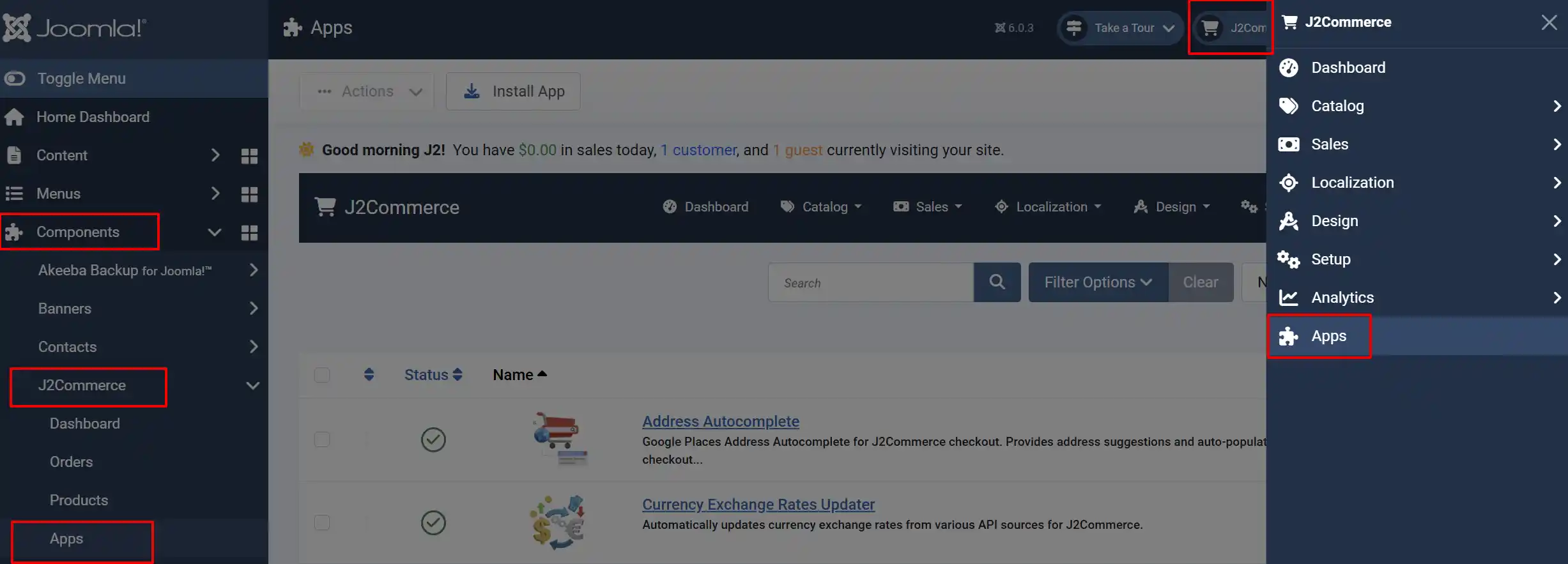
Search for Subscription - Exclude Renewal Inventory, click the X, and it will turn into a green checkmark. It is now enabled and ready for setup.
Configure the Plugin
Click the Toggle Inline Help button in the toolbar and the app will show a description below each field as you configure it.
This plugin has one configuration option.
Debug Mode: Write a log file recording each order item that is excluded from stock reduction. The log is saved to the Joomla log directory as app_subscriptionexcluderenewalinventory.php. Disable this in production.
To save your settings, click Save or Save & Close.
How It Works
After enabling the plugin, no further action is required. The exclusion is fully automatic.
When a subscription renewal order is processed, J2Commerce fires an event before reducing stock for each order item. This plugin intercepts that event and checks the item type. If the item is a subscription renewal (subscription_renewal) or a subscription order item (subscription), the plugin instructs J2Commerce to skip the stock reduction for that item entirely.
Initial subscription purchases are not affected — when a customer subscribes for the first time, stock is reduced as usual.
Here is a summary of what happens depending on order type:
| Order Type | Stock Reduced? |
|---|---|
| First-time subscription purchase | Yes — stock is deducted normally |
| Subscription renewal | No — stock deduction is skipped |
| Regular (non-subscription) order | Yes — not affected by this plugin |
Use Cases
This plugin is most useful for stores that sell physical goods on a subscription basis where the customer holds the item for the duration of the subscription.
Equipment rental — A customer rents a power tool for 12 months with monthly billing. The tool is already with the customer when each renewal fires, so stock should not decrease every month.
Lease agreements — A furniture store leases dining sets with annual renewals. One unit leaves the warehouse at lease start; renewals should not show additional units leaving stock.
Uniform or workwear services — A company leases staff uniforms that are collected and replaced periodically. Only the initial dispatch affects inventory.
Software or access-based subscriptions with physical fulfillment — Subscriptions that include a physical item shipped once at sign-up, then renewed digitally, should only record one inventory deduction.
If your subscription model works differently — for example, each renewal involves shipping a new physical item — you should leave this plugin disabled, because deducting stock on each renewal is the correct behaviour in that case.
What's New in J2Commerce
Version 6.0.0
- Initial release for J2Commerce 6.
- Automatically excludes subscription renewal order items from inventory reduction.
- Debug mode added for logging excluded items to the Joomla log directory.
Troubleshooting
Stock is still being reduced on renewals
Cause: The plugin is installed but not enabled, or it was enabled after renewals were already processed.
Solution:
- Go to J2Commerce -> Apps
- Search for Subscription - Exclude Renewal Inventory and confirm the status shows as enabled (green toggle).
- If it was just enabled, future renewals will be excluded. Past renewals that already reduced stock must be adjusted manually if needed.
I cannot find the plugin in the Apps list
Cause: The plugin is not installed, or it is installed but disabled.
Solution:
- Go to System -> Manage -> Extensions and search for
subscriptionexcluderenewalinventory. - If it does not appear, the package was not installed. Follow the Installation steps at the begiining of the documentation.
- If it appears but shows as disabled (with a gray X), enable it by clicking on the X
Debug mode is enabled but no log file appears
Cause: The Joomla logs directory may not be writable, or no subscription renewals have been processed since enabling debug mode.
Solution:
- Confirm Debug Mode is set to Yes and click Save.
- Process a test renewal order.
- Check the
administrator/logs/directory forapp_subscriptionexcluderenewalinventory.php. - If the file is missing, verify that the
administrator/logs/directory is writable by your web server. Contact your hosting provider if you are unsure how to check directory permissions.
Initial subscription purchases are not reducing stock
Cause: This plugin does not affect initial purchases — something else is controlling stock reduction. Check that inventory tracking is enabled on the product and that stock levels are set correctly.
Solution:
- Open the product in J2Commerce -> Catalog -> Products.
- Go to the Inventory tab and confirm Manage Stock is enabled and the stock quantity is greater than zero.
- Disable this plugin temporarily to confirm it is not the cause. If stock still does not reduce with the plugin disabled, the issue is unrelated to this add-on.