Change Password
This app enables the change password feature in J2Commerce's My Profile page. It allows customers to change their account passwords in their profile page.
Requirements
- PHP 8.1.0 +
- Joomla! 4.x/ Joomla! 5.x +
- J2Commerce / J2Store 4.x +
Installation:
Step 1: Go to our J2Commerce website > Extensions > Apps
Step 2: Locate the Change Password App > click View Details > Add to cart > Checkout.
Step 3: Go to your My Downloads under your profile button at the top right corner and search for the app. Click Available Versions > View Files > Download Now
Install the App
Go to System > Install > Extensions > Install the app
-e0515ef561b368cb4d5a053cacb4c525.webp)
Enable the App
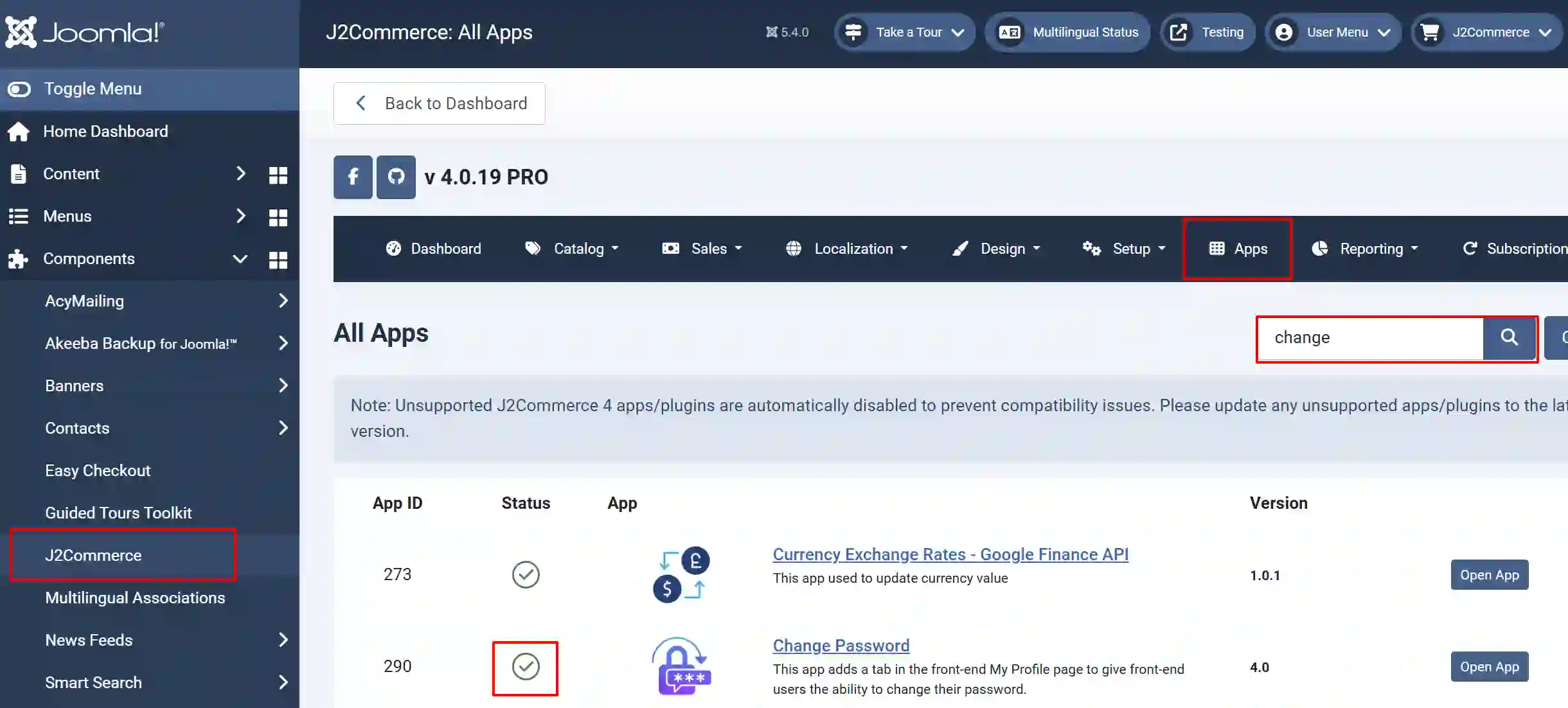
Go to J2Commerce > Apps > search for the Change Password app
Click on the 'X' under Status to enable it.
Frontend View
Once enabled, go to the My Profile or My Account page at the store's frontend, log in, and you can see an additional tab named Change Password.
