Pay later/Pay Against Invoice
Invoice your customers and allow them to pay for the order online at a later date. There can be a number of situations when you want to send the invoice to the customer, complete the terms, and then collect payments.
Invoice first, and collect payment online. Allow customers to re-try payment for unpaid orders
Requirements
- PHP 8.1.0 +
- Joomla! 4.x/ Joomla! 5.x +
- J2Commerce / J2Store 4.x +
Purchase the App
Step 1: Go to our J2Commerce website > Extensions > Apps
Step 2: Locate the Pay Later Invoice App > click View Details > Add to cart > Checkout.
Step 3: Go to your My Downloads under your profile button at the top right corner and search for the app. Click Available Versions > View Files > Download Now
Install the App
Go to System > Install > Extensions > Install the app
-e0515ef561b368cb4d5a053cacb4c525.webp)
Enable the App
Go to J2Commerce > Apps > search for the Pay Later Invoice app
Click on the 'X' under Status to enable it.
Click on "Open App" or the Title to start setting up the app
Setting up the Parameters
Basic Settings tab
It is very simple and easy to get started with this app. There are no complex settings that need to be configured. You just enter the time interval during which the re-order link should appear/disappear.
Profile Reorder enabled after this time interval(in seconds): Enter the time (in seconds) at which the re-order link should appear on the customer’s order history page. For example, 60 seconds. The reorder link will appear after 60 seconds from the time the customer abandoned the order.
Profile Reorder link expired (in days): Define when the re-order link should disappear from the customer’s order history page. For example, 5. The re-order link will expire after 5 days.
Pay button text: Text entered here will be displayed in the order history page. If you are using my multilingual site, enter the value as a language string.
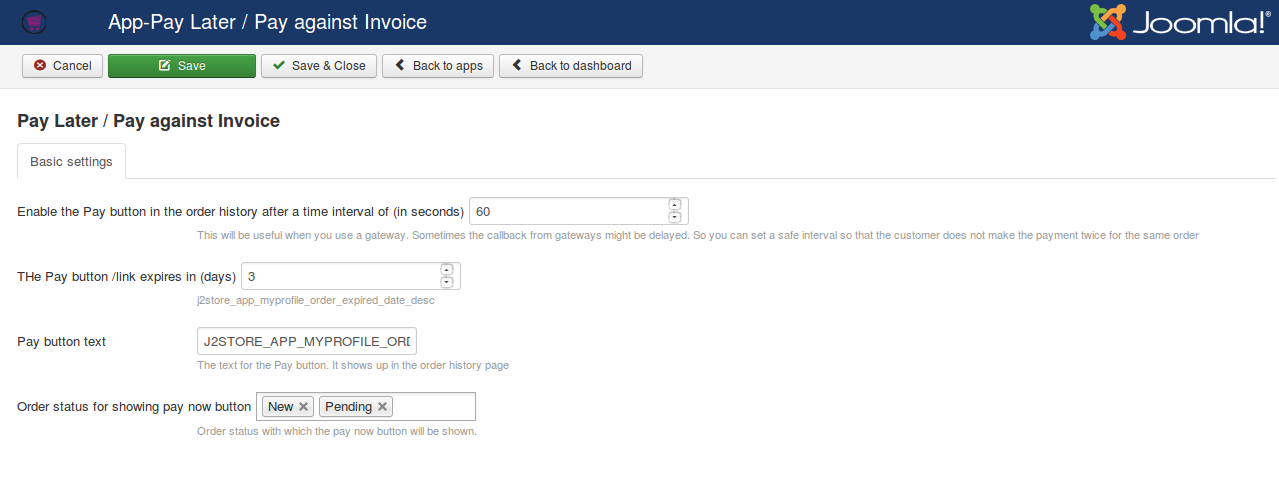
Order status for showing the pay now button: Choose the order status for which the Pay button should be displayed.
Use cases
This app can be possible at below two use cases.
Use Case 1: Invoice first, collect payment online
In the traditional methods, you would have to ask customers to manually transfer the money to your bank. You can now automate this process.
Just create an order in the backend, send the invoice to the customer, and when he is ready, he can just view the order and make the payment online. No hassles in collecting payments.
For example, consider that you are designing and selling gift cards. You can get the quote and gift card details from the customer. Once you have finished designing the gift card and it is ready to sell, just create an unpaid order from the store backend and send the invoice. So the customer can view the order and make the payment online.
Use Case 2: Allow customers to re-try payment for unpaid orders
Sometimes, customers abandon the order and leave your site without making a payment. You can now easily close those abandoned orders by allowing customers to re-try the payment from their order history page.
Frontend screenshots
Re-order link appears
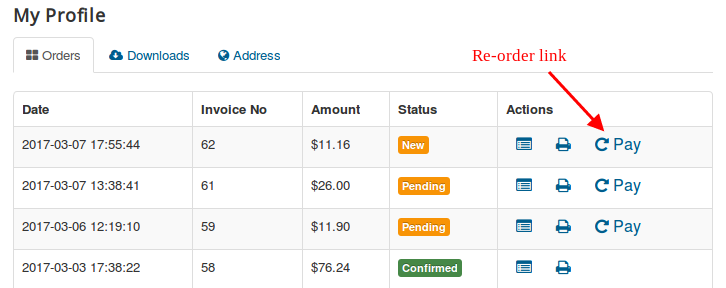
After clicking on Re-order link,

Order summary
