Points and Rewards
This app used to give reward points to users. The user can use those points for purchase.
Requirements
- PHP 8.1.0 +
- Joomla! 4.x/ Joomla! 5.x +
- J2Commerce / J2Store 4.x +
Point and Rewards plugin
Purchase the App
Step 1: Go to our J2Commerce website > Extensions > Apps
Step 2: Locate the Point and Rewards App > click View Details > Add to cart > Checkout.
Step 3: Go to your My Downloads under your profile button at the top right corner and search for the app. Click Available Versions > View Files > Download Now
Install the App
Go to System > Install > Extensions > Install the app
-e0515ef561b368cb4d5a053cacb4c525.webp)
Enable the App
Go to J2Commerce > Apps > search for the Point and Rewards app
Click on the 'X' under Status to enable it.
Click on "Open App" or the Title to start setting up the app
Setting up the Parameters
Points Settings
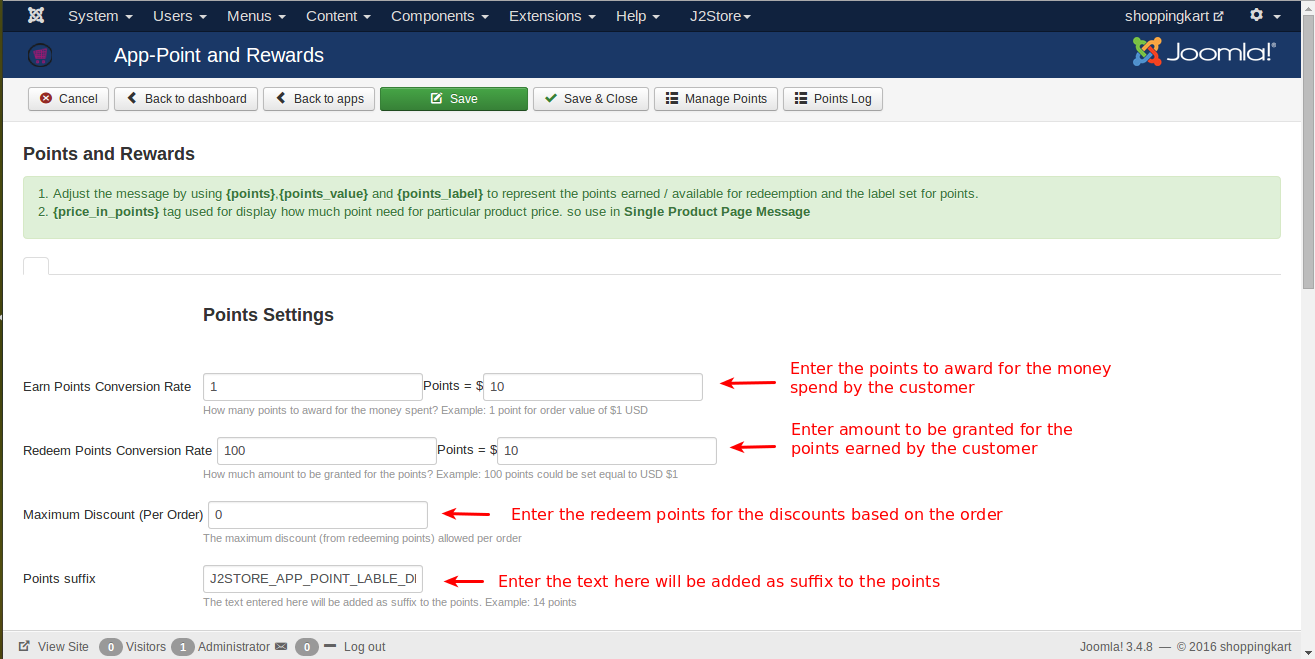
Earn Points Conversion rate: Enter the points to be awarded for the money spent by the customer. For example,1 point = $10. The customer will be awarded 1 point for the amount they spent.
Redeem points conversion rate: Enter the amount to be granted for the points earned by the customer. For example, 100 points = $10. The customer will be granted $10 for the points he earned (100 points).
Maximum Discount(Per order): Enter the redeem points for the discounts based on the order.
Points suffix: The text entered here will be added as a suffix to the points. For example, 14 credits.
Round points: Setting this to Yes will round the points. For example, if the point is in decimal (0.60), it will change the decimal to a whole number.
Rounding decimal places: The value entered here will be used to display the point with the decimal place.
Round discount amount? Setting this to Yes will round the discount amount.
Add points to the customer account if the order status matches: Points will be added only if the order status matches the selected one. For example, if you have chosen the status confirmed, then the points will be added only when the order status matches the selected status. Preferred status: Confirmed.
Reduce points from the customer account if the order status matches: Points will be removed from the customer account if the status of the order matches the selected. For example, if you have chosen Confirmed and Pending, then points will be removed only when the order status matches the chosen.
Recover points from the order if the order status matches: the Point applied to the order, but for some reason the order failed, we need to recover the point and add it to the customer's point.
How many point transactions do I show in my profile? You can change the user's point transaction count in My Profile.
The discount amount needs to be reduced from the discount account to include tax? If you would like to reduce the discounted amount of tax from the total discount amount, set this option to Yes. This option works only if it includes tax.
Product/Cart/Checkout/ Messages
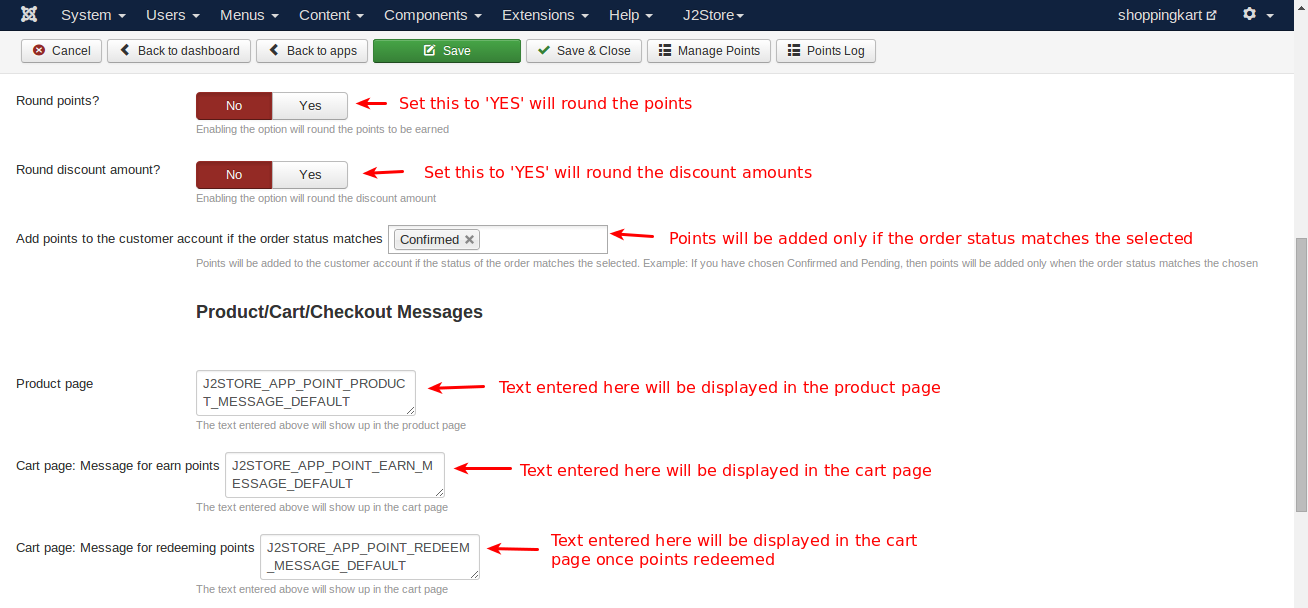
Product page: You can enter a custom message you want to display on the product page about earning reward points on every purchase of the product.
Cart page: Message showing how many points the customer could earn for the current cart: You can enter a custom message you want to display on the cart page about earning reward points when the customer completes the order.
Cart page: Message for existing users having points and how much they can redeem for the current cart: You can enter the redeem points message, so that customer can apply their points to get a discount.
Award points for certain actions
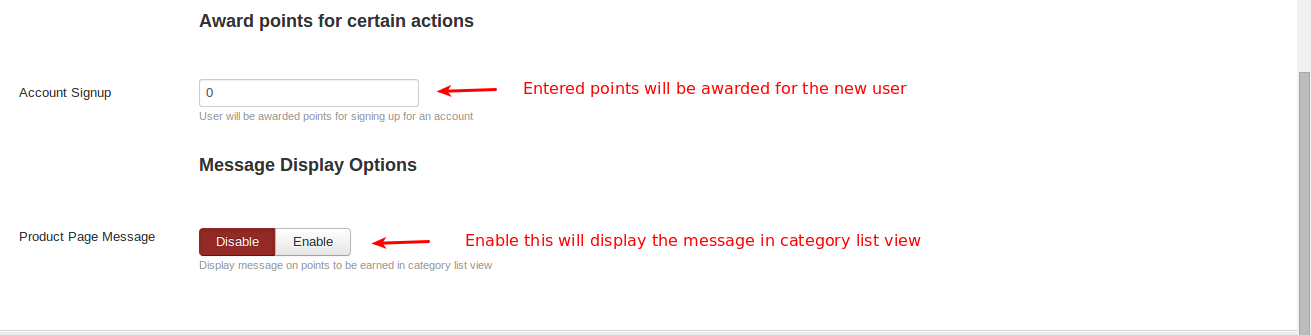
Account Sign-up: Enter the number of rewards for the new customer registration.
Product Page Message: Set this to Yes to display the reward points information message in the category list view.
Custom Tags
- Adjust the message by using
{points},{points_value}, and{points_label}to represent the points earned / available for redemption and the label set for points. {price_in_points}tag is used to display how many points are needed for a particular product price. So use it in the Single Product Page Message.
Front page
Go to J2store Product Shop, you can see the information displayed about the rewards and points. 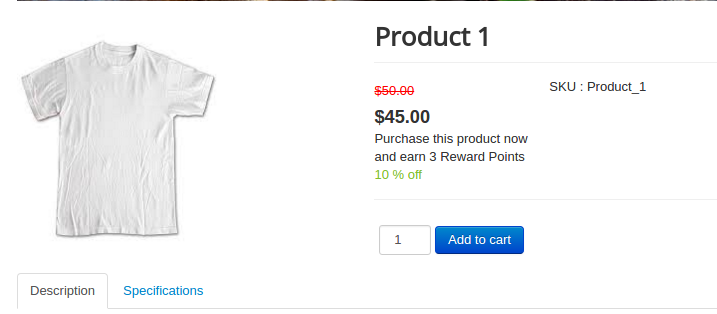
My Profile
Go to My Profile Menu > Rewards (Tabs)
Here you can see a list of points you earned